Application Function Model (EN50090-6-2)
Overview
The concept of an Application Function is essential in building automation systems as it represents the necessary functionality based on customer requirements. It involves processing information from sensors, actuators, or other Application Functions to generate output data. This output data is then used by actuators or downstream Application Functions. To capture specific process variables or states in its control loop. Additionally, an Application Function directly or indirectly affects the primary "type of interest" with a physical quantity related to a phenomenon or equipment. It also operates within specific trades, such as heating, ventilation, lighting, and more.
In both the semantic world and the real world, it is common for entities to inherit multiple concepts. This means that a specific Application Function can belong to more than one category. For example, the diagram below illustrates that energy control functions or subparts often fall under equipment control as well. To control energy flow, equipment is necessary to regulate water or air (phenomenon). The following examples explains this in more detail. Volume 7 of the KNX specification outlines functional blocks that the Application Function depicted in the green boxes can use.

The following Application Functions fall into different categories. Each category represents a hierarchical order based on trades, primary "type of interest" (phenomenon or equipment), or crosscutting functions that can span multiple trades. Standards like ISO 52120-1 or SAREF define specific categories. For example, ISO 52120-1 defines "energyCtrl", "lightingCtrl", and "shadingCtrl". On the other hand, SAREF defines parts of "equipmentCtrl". The ontology incorporates and follows these standards. Application Functions define functional behavior independent of individual devices or equipment. A specific Application Function can belong to multiple categories simultaneously.
- en50090-6-2/core:Aspect: Aspect represents a generic referencing mechanism between one or more points that reflects a specific view of the installation.
- en50090-6-2/core:ApplicationFunction: An application function combines a set of individual functionalities to achieve its desired behavior, typically with a combination of devices exchanging information via their input and output datapoints.
- accessCtrl: Access control represents application functions for controlling access to buildings, rooms, or other secured areas. This includes door control, doorbell functionality, and related security features.
- doorCtrl: Controls access through doors by operating door locks and related access control equipment.
- doorbellCtrl: Monitors doorbell activation and detects the presence of persons at entrances.
- doorCtrl: Controls access through doors by operating door locks and related access control equipment.
- airCtrl: A specific Application Function category that controls a quantity (for example, temperature, pressure) of the phenomenon air. EN 50090-6-2 specifies the parent concepts from which this category derives.
- airHumidityCtrl: Application functions that controls the quantity 'air humidity'.
- airPressureCtrl: Application functions that controls the quantity 'air pressure.'
- airQualityCtrl: Application functions that controls the quantity 'air quality'.
- airSupplyCtrl: The air supply control Application Function connects and coordinates air and energy flow between air treatment (for example, air handling unit) and energy consumer (emission control).
- airTemperatureCtrl: Application functions that controls the quantity 'air temperature'.
- airVolumeCtrl: Application functions that controls the quantity 'air volume'.
- audioCtrl: A specific Application Function category that controls the audio system. Parent concepts specified as part of the EN 50090-6-2 derive the category.
- energyCtrl: A specific Application Function category for energy control that reflect an active process of planning, monitoring, and optimizing the energy production, consumption, distribution and storage. EN 50090-6-2 specifies the parent concepts from which this category derives.
- dhwCtrl: The Domestic Hot Water Control Application Function represents a process of providing domestic hot water (DHW) for the kitchen and bathroom sinks, tubs and other appliances.
- distributionCtrl: A specific Application Function that represents a process to provide a supply media to the consumer according to energy demand keeping losses in distribution and generation to an absolute minimum. distrCtrl functions control usually energy flow via water or air in pipes or ducts from energy generation to energy consumer in rooms (emission control).
- emissionCtrl: A specific Application Function to optimize different energy consumers. An emissionCtrl is an energy saving Application Functions and routines based on the actual use of a building (space), depending on real user needs, to avoid unnecessary energy use and CO2 emissions.
- individualRoomCtrl: The Application Function controls the air temperature of an single room, thereby maximizing comfort and minimizing energy costs.
- zoneHeatingCtrl: The Application Function controls the 'air temperature' of a room or zone (group of rooms or space) individually, thereby maximizing comfort and minimizing energy costs. The control loop often uses the outside temperature or a reference room temperature as a process variable.
- energyStorageCtrl: A specific Application Function to optimize different energy storage systems.
- generationCtrl: A specific Application Function that controls energy production. The Application Function represents a process of generating energy to the consumer according to energy demand keeping losses in distribution and generation to an absolute minimum.
- smartGridCtrl: Specific Application Function for "Smart Grid control." A Smart grid is a network of transmission lines, substations, transformers that delivers electricity from points of generation to points of consumption with two-way communication to provide efficient and reliable energy flow.
- equipmentCtrl: A specific Application Function category that controls application functions is a specific category that represents an expected behavior or functionality of an equipment such as a 2-step fan speed control or an aggregation of application functions such as Air Handler Unit etc. Also, a QualityKind can express the behavior or rather the effect in the real world. EN 50090-6-2 specifies the parent concepts from which this category derives.
- ahuCtrl: An Air Handling Unit (AHU) is an Application Function that controls equipment to regulate and circulate air as part of a heating, ventilating, and air-conditioning (HVAC) system. An AHU Application Function usually has sub-functions such as fanCtrl, pumpCtrl etc.
- energyConversionCtrl: The distribution flow function, energyConversionCtrl, regulates energy conversion or heat transfer between subsystems. In the case of its usage in an energy flow distribution system, this function may also derive from distributionCtrl, generationCtrl etc.
- boilerCtrl: The boiler control function manages the operation of a closed, pressure-rated vessel known as a boiler. This boiler utilizes an energy source, such as natural gas, heating oil, or electricity, to heat water or another fluid. The system subsequently circulates the heated fluid out of the boiler for use in a variety of processes or heating applications.
- burnerCtrl: The burner control function controls equipment or devices responsible for converting fuel into heat through combustion. This function encompasses various types of burners, including those utilizing gas, oil, and wood as fuel sources.
- electricMotorCtrl: The electric motor control function manages the operation of a motor, which is an engine designed to convert electrical energy into mechanical energy.
- humidifierCtrl: The humidifier control function controls the operation of an equipment designed to introduce moisture into the air.
- radiatorCtrl: Radiators and convectors are energy exchangers (heat or cool) designed to transfer thermal energy from one medium to another for the purpose of space heating or cooling.
- convectorRadiatorCtrl: A convection heater (radiator) or cooler utilizes convection currents and circulate air. These currents move through the appliance and across its heating or cooling element, using thermal conduction to warm or cool the air.
- radiantCeilingCtrl: Radiant Ceiling Ctrl is a form of central cooling (for example, chilled beam) or heating that achieves indoor climate control for thermal comfort using hydronic elements embedded in a ceiling.
- radiantUnderfloorCtrl: Radiant Underfloor Ctrl is a form of central heating (underfloor heating) or cooling that achieves indoor climate control for thermal comfort using hydronic or electrical heating elements embedded in a floor. Conduction, radiation and convection achieve heating.
- flowControllerCtrl: The flowControllerCtrl function controls a distribution flow element, which systems use to regulate the flow, for example, of water or air. When used in an energy flow distribution system, this function may also derive from distributionCtrl.
- airDamperCtrl: Air damper control regulates the amount of heat or cool air that distributes within a building duct system for intake, exhaust, or mixed air.
- vavAirDamperCtrl: Controls the air volume supplied to or extracted from a room via the ventilation damper to maintain constant flow under varying pressure conditions.
- valveCtrl: The valve control function controls a valve, such as in piping distribution systems, to control or modulate the flow of fluids.
- airDamperCtrl: Air damper control regulates the amount of heat or cool air that distributes within a building duct system for intake, exhaust, or mixed air.
- flowMovingCtrl: The flowMovingCtrl control function controls devices or equipment involved in the distribution, circulation, or conveyance of fluids, including liquids and gases. Examples of such equipment include pumps or fans in a flow distribution system.
- fanCtrl: A specific Application Function that controls, for example, the speed of a fan.
- fanCoilCtrl: Controls the fan-coil unit as a heat or cooling emitter at room level.
- pumpCtrl: A specific Application Function that controls, for example, the speed of a pump.
- switchCtrl: An Application Function for a generic switching of an equipment, such as an actuator terminal or similar.
- fanCtrl: A specific Application Function that controls, for example, the speed of a fan.
- lightingCtrl: A specific Application Function category that provides illumination and controls luminaries. EN 50090-6-2 specifies the parent concepts from which this category derives.
- lightingDaylightCtrl: Daylight-dependent lighting automatically turns on room lights when daylight in the room falls below a set level and turns them off when daylight is sufficient.
- lightingConstantCtrl: Constant-light control automatically maintains room lighting at a minimum brightness level for good visibility while saving energy.
- lightingOccupancyCtrl: Occupancy-dependent lighting control automatically turns lights on or off based on room occupancy.
- lightingTwilightCtrl: Twilight control automatically adjusts lighting based on outdoor brightness. It switches lights on at dusk and off at dawn by generating control signals according to measured daylight levels.
- lightingSwitchCtrl: Manual on/off switching control for lighting.
- lightingDimmingCtrl: Manual dimming control that adjusts light levels by dimming down, up and switching off.
- lightingDaylightCtrl: Daylight-dependent lighting automatically turns on room lights when daylight in the room falls below a set level and turns them off when daylight is sufficient.
- monitoring: A specific Application Function category for 'monitoring' a zone, equipment or energy consumption (metering). EN 50090-6-2 specifies the parent concepts from which this category derives.
- fireAlarming: Application functions to monitor a 'fire alarm'.
- intrusionAlarming: Application functions to monitor an 'intrusion alarm'.
- meter: Application Function 'meter' aggregates consumption measurement points of one or many metering devices.
- trend: A trend application function monitors live and historical, time-indexed, quantitative etc. data, for example, for visualization.
- video: Video data and camera management function.
- weatherStation: Application function weather station aggregates outside measurement points.
- plantMngmtCtrl: A specific Application Function category for overall management functions of a plant or a part of a plant. For example, a Scheduler automatically schedules the systems, such as heating, ventilation, and lighting, to coordinate with facility usage. EN 50090-6-2 specifies the parent concepts from which this category derives.
- alarming: Alarming is the automated alarm management in the event of alarms or faults in plants, subsystems or devices. The application function may contain a list of active alarms, past alarms, alarm prioritization or sends a notification to recipients (for example, email).
- scheduler: Scheduling in a building automation system is the process of systematically matching the use of heating, ventilation and air conditioning equipment with tenant occupancy schedules which is typically calendar-based.
- timeSynchronization: Time synchronization coordinates independent clocks on different devices.
- sceneCtrl: A specific Application Function category that controls a customized setting of different trades for an activity or situation. Scene controllers are intelligent pre-configured settings that orchestrate multiple devices and settings with a single touch of a button or a simple voice command. Parent concepts specified as part of the EN 50090-6-2 derive the category.
- shadingCtrl: A specific Application Function category that controls the solar irradiance by means of motorized sun protection. Often there are protection functions that interfere with the sun protection. EN 50090-6-2 specifies the parent concepts from which this category derives.
- blindCtrl: Manually control the solar irradiation by means of motorized solar protection (roller blinds, Venetian blinds, blinds, and awnings).
- solarProtectionCtrl: Shading control prevents glare and discomfort from strong sunlight by moving the shading system to a fixed anti-glare position when daylight exceeds a set brightness level. When brightness decreases, the shading returns to its parking position.
- weatherProtectionCtrl: The function Weather protection prevents damage to external solar protection equipment due to wind, rain or icing. Whereas sensors measure wind velocity and rain directly, the system predicts the icing hazard indirectly through evaluation of precipitation in combination with the outdoor temperature. To this end, the application function processes the input information from the sensor functions Wind velocity measurement, Temperature measurement and Precipitation detection and, in case of a damage hazard, generates a positioning command to the Shading Control.
- waterCtrl: A specific Application Function category that controls a quantity (for example, temperature, pressure) of the phenomenon water. EN 50090-6-2 specifies the parent concepts from which this category derives.
- coldWaterDistribution: The cold water distribution Application Function connects and coordinates water and energy flow between production of chilled water (cooling) and consumer (emission control).
- hotWaterDistribution: The hot water distribution Application Function connects and coordinates water and energy flow between energy generation/production (heating) and energy consumer (emission control).
- waterDifferentialPressureCtrl: Application Functions that controls the quantity 'water pressure'.
- waterTemperatureCtrl: Application Functions that controls the quantity 'water temperature'.
- accessCtrl: Access control represents application functions for controlling access to buildings, rooms, or other secured areas. This includes door control, doorbell functionality, and related security features.
- en50090-6-2/core:ApplicationFunction: An application function combines a set of individual functionalities to achieve its desired behavior, typically with a combination of devices exchanging information via their input and output datapoints.
Application Function Examples
The entity diagram in the following sections reflects a functional block or plant diagrams of concrete projects. They use the EN50090-6-2 based semantic model. The boxes labeled with an "E" represent entities. They represent concepts. Illustrations include Application Function, Location, Function Point, etc. The entity diagram describes the classes and individuals of the ETS project export. Formats like JSON-LD can represent this export.
Functional Blocks refer to specific, tangible functionality within a device. Application Functions are configurations within a tool that combines functionalities from one or multiple devices. These functionalities can be Functional Blocks or Channels.
Energy Efficiency Class
The following sections contain energy efficiency class examples. ISO 52120-1 is an international standard that guides the assessment of energy performance in buildings and building automation systems. It focuses on the impact of building automation and control systems (BACS) on energy efficiency. The standard provides guidelines for evaluating building energy performance and classifies buildings into different energy efficiency classes. It helps optimize energy consumption and reduce emissions by guiding the implementation and operation of energy-efficient building automation systems.
Lighting Control
A lighting control system is a network-based solution that enables communication between different inputs and outputs for lighting control. It controls indoor and outdoor lighting in commercial, industrial, and residential spaces. These systems may have energy-efficient fixtures and automated controls that adapt to occupancy and daylight conditions. Lighting control serves both aesthetic and practical purposes.
Light w/ Scene Control Example
The following figure shows the connections between a LSAB actuator, LSSB sensor, and a Scene Sensor SCS (see also Volume 7/20/2 of the KNX specification). The SCS provides NumberedSceneControl information to recall or teach-in a scene. A dedicated SceneGroup distributes this information.
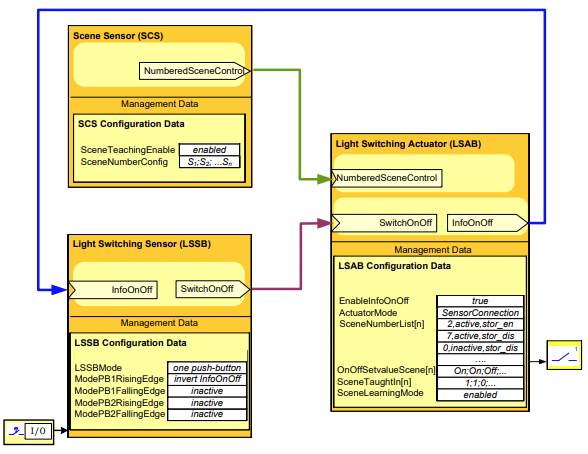
On the LSAB, the NumberedSceneControl input has the same priority as the SwitchOnOff input. When the LSAB in the SceneGroup receives a NumberedSceneControl command, it processes it. After executing a scene recall command, the LSAB group-speaker provides updated InfoOnOff feedback. The execution of the scene command depends on various local scene configuration parameters, so different LSAB in the same lighting group may react differently. Therefore, the InfoOnOff status of the group-speaker does not represent the state of all LSAB in the lighting group.
Light w/ Scene Control Entity Diagram
The entity diagrams below illustrates the Application Function relationships between an LSAB actuator, LSSB sensor, and a Scene Sensor SCS. These components distribute across three different devices. A tool configures three Group Objects (Function Points) to enable runtime communication and exchange data. The LightCtrl_1 Application Function has a relationship with location "Outside" in the garden. The purple boxes including GO 1/2/* represent project/installation specific instances within the diagram.
Application Function:

The following JSON-LD example highlights the light Application Function Point used in the previous example and later depicted in the diagram below. The presence of "isApplicationFunctionOf" in conjunction with "actsOnPhenomenonQualityKind" indicates that this application function adjusts the light of an outside location.
{
    "@context": {
        "core": "http://schema.knx.org/2023/en50090-6-2/core#",
        "dct": "http://purl.org/dc/terms/",
        "knx": "http://schema.knx.org/2020/ontology/knx#",
        "quantitykind": "http://qudt.org/vocab/quantitykind/",
        "tag": "http://schema.knx.org/2023/en50090-6-2/tag#",
        "prj": "https://prj.knx.org/977a1454-ff4f-4670-92bc-a003cb651eda#"
    },
    "@graph": [
        {
            "@id": "prj:LightCtrl_1",
            "@type": [
                "knx:lightingSwitchCtrl",
                "knx:sceneCtrl"
            ],
            "dct:title": "Lighting Control",
            "tag:operatesForTrade": [
                "tag:lighting"
            ],
            "tag:actsOnPhenomenonQualityKind": {
                "tag:hasPhenomenonType": "tag:light",
                "tag:hasQuantityKind": "quantitykind:LuminousFlux"
            },
            "loc:isApplicationFunctionOf": {
                "@id": "prj:Outside_1"
            }
        }
    ]
}
Function Points:

Light Dimming Control Example
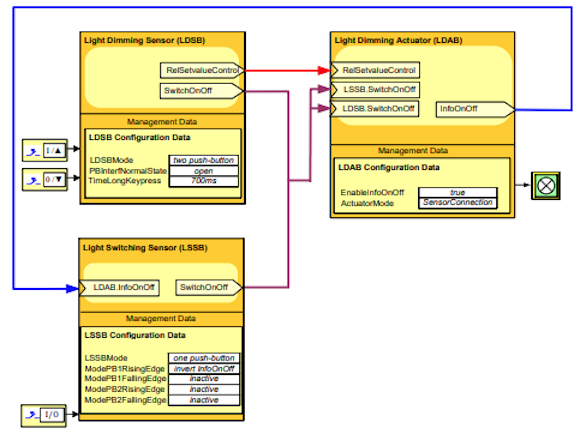
The next figure shows how combined light switching and dimming functionality in the same lighting group. Both LSSB and LDSB provide SwitchOnOff control commands. LSAB executes the SwitchOnOff commands from LSSB and LDSB using the "last wins" principle. LDAB processes dimming commands from LDSB. It then changes the On/Off state of LDAB. One LDAB actuator, configured as a group-speaker, provides feedback information (InfoOnOff). This supports toggle functionality in LSSB and LDSB. It may also synchronize the On/Off state of additional parallel LSAB in the same lighting group (not in the figure).
Light Dimming Control Entity Diagram
The next diagrams illustrates the Application Function relationships between an LDSB sensor, LSSB sensor, and a Dimming Actuator LDAB. Three different devices contain these components. A tool configures three Group Objects (Function Points) to enable runtime communication and exchange data. The LightDimmingCtrl_165 Application Function of an office room has a relationship with location "Inside." The boxes including GO 1/2/* show project-specific instances.
Application Function:

Function Points:

Individual Room Control
Individual room control in an HVAC system refers to the ability to independently adjust the temperature and airflow in each individual room or space. Instead of one thermostat controlling the whole building, you can customize settings for different areas. Using separate temperature sensors, dampers, and controls for each room or zone achieves this.
Fan Coil Control Example
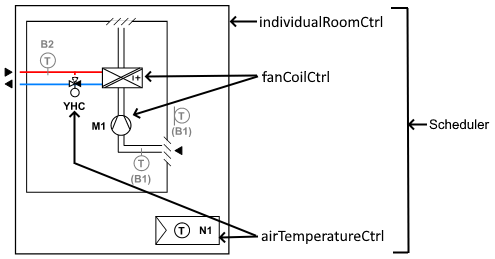
A two-pipe fan coil unit (FCU) is a component commonly used in building automation systems for heating purposes. It regulates the temperature of a specific space within a building. The following plant diagram describes a typical two-pipe FCU.
The diagram consists of a fan, a heating coil actuator and room sensor. The fan is responsible for circulating the air within the space. It can operate at different speeds to adjust the airflow as required.
Several factors, including temperature sensors (room and outside), occupancy sensors, and time schedules, facilitate the control of the two-pipe FCU. These inputs enable the precise regulation of the operation of the FCU to maintain optimal comfort and energy efficiency in the room.
Fan Coil Application with External Temperature Sensor Entity Diagram
This example highlights that 2PipeFanCoilCtrl_142 supports multiple Application Functions with the same software. The Scheduler is already integrated in the software but the temperature value comes from an external sensor device via configured Group Object (Function Point). The information depicted in the diagram can be useful for automatic device linking or for energy efficiency classification per ISO 52120-1 standard.

The following JSON-LD example depicts a fan coil Application Function derived from the previous example. The usage of "isApplicationFunctionOf" in combination with "actsOnPhenomenonQualityKind" indicates that this application function regulates the room temperature within a building.
{
    "@context": {
        "core": "http://schema.knx.org/2023/en50090-6-2/core#",
        "dct": "http://purl.org/dc/terms/",
        "knx": "http://schema.knx.org/2020/ontology/knx#",
        "quantitykind": "http://qudt.org/vocab/quantitykind/",
        "tag": "http://schema.knx.org/2023/en50090-6-2/tag#",
        "prj": "https://prj.knx.org/977a1454-ff4f-4670-92bc-a003cb651eda#"
    },
    "@graph": [
        {
            "@id": "prj:2PipeFanCoilCtrl_142",
            "@type": [
                "knx:individualRoomCtrl",
                "knx:airTemperatureCtrl",
                "knx:scheduler",
                "knx:fanCoilCtrl"
            ],
            "dct:title": "Fan Coil Control",
            "tag:operatesForTrade": [
                "tag:heating",
                "ventilation"
            ],
            "tag:actsOnPhenomenonQualityKind": {
                "tag:hasPhenomenonType": "tag:air",
                "tag:hasQuantityKind": "quantitykind:Temperature",
                "tag:hasLocality": "tag:Room"
            },
            "tag:adjustsEquipmentQualityKind": {
                "tag:hasEquipmentType": "tag:fanMotor",
                "tag:hasQuantityKind": "quantitykind:AngularVelocity",
                "tag:hasLocality": "tag:ductSection"
            },
            "loc:isApplicationFunctionOf": {
                "@id": "prj:Room_142"
            }
        }
    ]
}
Fan Coil Application with External Scheduler Entity Diagram
The following example uses the same 2PipeFanCoilCtrl_142 software as before but uses the internal room temperature and the Scheduler is external (configured Function Point). Also, a reasoner has derived a relationship interactsWithApplicationFunction based on the group object GO 1/2/2. The purple boxes represent specific project/installation instances within the diagram.

Convector Radiator Example
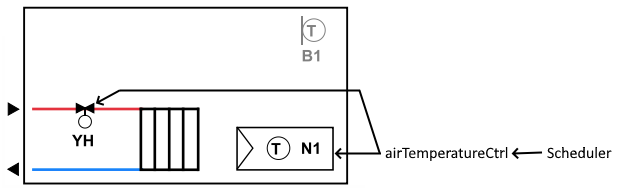
The next diagram consists of a radiator valve and a room temperature sensor. The valve actuator controls the water flows thru the convection heater (radiator).
The control of the valve actuator uses several factors, including temperature sensors (room and outside), occupancy sensors, and time schedules.
Convector Radiator Entity Diagram
This example shows a simple radiator control (RadiatorCtrl_154) with an external sensor. The purple boxes represent specific project instance of entities: a Function Point representing the configured Group Object, an Application Function and the Location room 162. The purple boxes represent specific project/installation instances within the diagram.

Energy Distribution Control
Application Functions can either consume energy (emissionCtrl), generate or transform energy (generationCtrl), or distribute energy between energy generation and emission control (distributionCtrl). The following heating example shows a radiator control Application Function and a valve that distributes energy from an energy generation Application Function to radiators in one or more rooms. Each room has a room temperature sensor and is individually controlled (IndividualRoomCtrl). The map connects the distribution and the consumer Application Function in the room, thus modeling the energy flow between the generator and the consumer (demands, interactsWithApplicationFunction). The energy generation Application Function is not shown in the picture but would again have a demands relationship with the corresponding Application Function.
One way to determine if an ApplicationFunction has a core:demands relationship is by checking for the "demand" PointFunctionType tag on the Point (EnergyDemand_In and EnergyDemand_Out). The tag "absoluteValue" along with the "unit" indicates that the energy demand is an absolute temperature value. For example, "I need water with a temperature of 35°C for heating."
ISO 52120-1 section "Control of distribution network hot water temperature" (table 6, 1.3), rates the Energy Efficiency Class of the configuration. It rates it as A for both residential and non-residential buildings.

The following JSON-LD example showcases the EnergyDemand_Out Point used in the previous example, along with the corresponding tags and properties that reasoning relationships can use. The presence of the actsOnPhenomenonQualityKind clearly indicates that a tool utilizes this datapoint to modify the water temperature in the heating pipe system.
{
    "@context": {
        "core": "http://schema.knx.org/2023/en50090-6-2/core#",
        "dct": "http://purl.org/dc/terms/",
        "jsonschema": "https://www.w3.org/2019/wot/json-schema#",
        "knx": "http://schema.knx.org/2020/ontology/knx#",
        "quantitykind": "http://qudt.org/vocab/quantitykind/",
        "qudt": "http://qudt.org/schema/qudt/",
        "tag": "http://schema.knx.org/2023/en50090-6-2/tag#",
        "unit": "http://qudt.org/vocab/unit/",
        "prj": "https://prj.knx.org/977a1454-ff4f-4670-92bc-a003cb651eda#"
    },
    "@graph": [
        {
            "@id": "prj:EnergyDemand_Out",
            "@type": "core:Datapoint",
            "dct:title": "Heating energy demand",
            "core:readable": "True",
            "core:writable": "False",
            "tag:operatesForTrade": [
                "tag:heating"
            ],
            "knx:datapointType": "knx:valueTemp",
            "jsonschema:minimum": 10,
            "jsonschema:maximum": 50,
            "qudt:unit": "unit:DEG_C",
            "tag:hasPointInterface": "tag:if.o",
            "tag:hasOperationKind": {
                "@type": "tag:OperationKind",
                "@id": "prj:ok_absvalue_demand",
                "tag:hasPointOperation": "absolutValue",
                "tag:hasPointFunctionType": "demand"
            },
            "tag:actsOnPhenomenonQualityKind": {
                "tag:hasPhenomenonType": "tag:water",
                "tag:hasQuantityKind": "quantitykind:Temperature",
                "tag:hasLocality": "tag:pipeSection"
            }
        }
    ]
}
Application Function with Sub-functions
Application functions can also relate to each other through aggregation of sub-functions. This means that a higher-level function coordinates other functions. The following example consists of a fanCoilCtrl Application Function that controls a fan (fanCtrl). Another example is an Air Handler Unit (AHU) that controls supply and exhaust fans, dampers, heating coils, etc. The model would also represent an AHU as an aggregation of various other Application Functions to express the individual sub-functions.
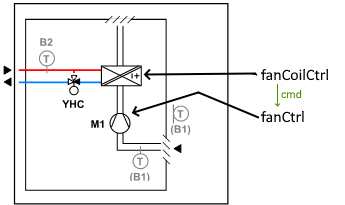
The following model represents the fanCoilCtrl Application Function depicted in the picture. The "hasSubApplicationFunction" relationship expresses the functional dependency. One method to determine if an Application Function has a hasSubApplicationFunction relationship is by examining the "cmd" PointFunctionType tag on the Point (FanCommand_OutDev1) in combination with the FunctionPoint GO. The tag "enumeration" indicates that the fan may have one or more steps. To confirm this, one would need to refer to the corresponding state type (not included in the model).

The JSON-LD example below illustrates the FanCommand_OutDev1 Point from the previous example, along with the relevant tags that reasoning relationships can use. The presence of the adjustsEquipmentQualityKind clearly indicates that a tool uses this datapoint for altering the physical status of a fan motor.
{
    "@context": {
        "core": "http://schema.knx.org/2023/en50090-6-2/core#",
        "dct": "http://purl.org/dc/terms/",
        "knx": "http://schema.knx.org/2020/ontology/knx#",
        "quantitykind": "http://qudt.org/vocab/quantitykind/",
        "tag": "http://schema.knx.org/2023/en50090-6-2/tag#",
        "prj": "https://prj.knx.org/977a1454-ff4f-4670-92bc-a003cb651eda#"
    },
    "@graph": [
        {
            "@id": "prj:FanCommand_OutDev1",
            "@type": "core:Datapoint",
            "dct:title": "Fan command ON/OFF",
            "core:readable": "True",
            "core:writable": "False",
            "tag:operatesForTrade": [
                "tag:heating",
                "tag:ventilation"
            ],
            "knx:datapointType": "knx:switch",
            "tag:hasPointInterface": "tag:if.o",
            "tag:hasOperationKind": {
                "@type": "tag:OperationKind",
                "@id": "prj:ok_cmd_enum",
                "tag:hasPointOperation": "enumeration",
                "tag:hasPointFunctionType": "cmd"
            },
            "tag:adjustsEquipmentQualityKind": {
                "tag:hasEquipmentType": "tag:fanMotor",
                "tag:hasQuantityKind": "quantitykind:AngularVelocity",
                "tag:hasLocality": "tag:ductSection"
            }
        }
    ]
}