Python Client Example
The KNX IoT Configuration Client is a Python CLI for commissioning and testing KNX IoT Point API devices. It targets developers who want to script or automate device commissioning. The client implements the relevant protocol stack (PASE, OSCORE, CoAP, S-Mode, etc.) directly. No external middleware or commissioning tool is necessary.
Combined with the KNX IoT Point API stack demo devices, the client provides a fast path to a working KNX IoT system. Build the demo devices, run four commands, and verify group communication end to end. Use this client as a simple alternative to ETS when implementing a demo application with a KNX IoT Point API device.
KNX IoT Configuration Client Repository and Setup
The KNX IoT Configuration Client source code and setup instructions are available at knx-iot-point-api-configuration-client.
Device Configuration Workflow
The client runs three commands to commission a device and one command to verify runtime group communication. Commands read from one or more configuration files that supply credentials, barcode data, and application parameters.
Demo Devices
The fastest way to try the workflow is with the KNX IoT Point API stack demo applications (for example, LSSB and LSAB). The knx-iot-point-api-configuration-client repository ships pre-built Linux binaries under tests/bin/linux/, and the Docker image runs them automatically as part of the headless integration tests. For building from source, see How to Build.
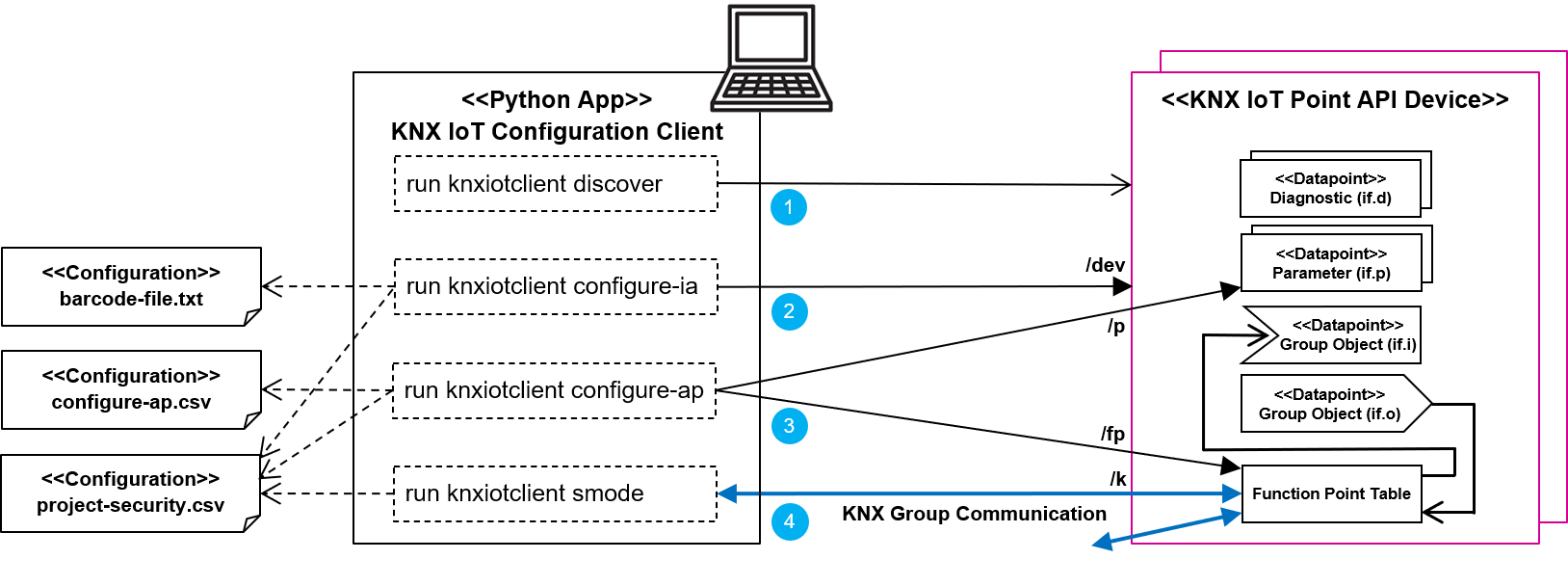
| Step | Command | Configuration File | Description |
|---|---|---|---|
| 1 | knxiotclient discover |
- | Find all KNX IoT Point API devices on the local network via mDNS or CoAP multicast. The client resolves each device by serial number via mDNS or CoAP multicast, so no IP address configuration is necessary. |
| 2 | knxiotclient configure-ia |
data/barcodes/DeviceBarcodes.txt, data/oscore_contexts/Project Security.csv |
Configure Individual Address (Part 1): SPAKE2+ / PASE handshake, OSCORE tool key install, IA assignment, and programming mode deactivation. |
| 3 | knxiotclient configure-ap |
data/projects/configure_ap_<device>.csv, data/oscore_contexts/Project Security.csv |
Configuration Download (Part 2): Function Point Table entries, group object bindings, and device parameter values. |
| 4 | knxiotclient smode |
data/oscore_contexts/Project Security.csv |
Send a KNX group communication message to a group address to verify end-to-end commissioning. |
Additional Commands
Beyond the four commissioning steps, the client provides commands for direct device interaction and maintenance.
- read / write / observe: read or write a single CoAP resource on a device, or subscribe to value changes; useful for inspecting live sensor values and automating integration tests
- update-firmware: push a
.knxfwpfirmware package to a device over OSCORE and verify the running version after reboot - factory-reset: wipe a device back to its factory state to restart the commissioning flow
Further Reading
- CLI Reference: full list of commands and options
- Docker Deployment: run the client and headless integration tests in a container