Horizontal Interworking
Horizontal interworking in Operational Technology (OT) systems enables seamless collaboration and communication among devices at the same functional level. In the context of HEBS (Home and Building Electronic Systems), horizontal interworking refers to the interaction and connectivity of building automation components within the same hierarchical level. This typically occurs within the same PERA layer or cybersecurity zone, focusing on the peer-to-peer communication between similar devices belonging to the same trade or application function.
Motivation
Efficient device-to-device communication in HEBS requires careful engineering of message exchange patterns to balance responsiveness, network efficiency, and energy consumption. KNX IoT addresses this through unified configuration in ETS. This enables product manufacturers and installers to engineer optimized communication (multicast or unicast) tailored to each application's specific requirements. This approach ensures that the configuration and activation include only necessary Group Objects, preventing unnecessary network traffic while maintaining system responsiveness.
This flexibility becomes particularly valuable for battery-powered devices, where communication patterns directly impact operational lifetime. Unicast communication minimizes radio transmissions for point-to-point connections. Meanwhile, multicast scenarios can leverage Thread Multicast Group IDs to filter messages at the network layer. This reduces unnecessary wake-ups of sleeping devices and extends battery life across the installation.
KNX Group Communication Configuration
KNX group communication with S-Mode (Standard Mode) is the fundamental mechanism for exchanging runtime data between KNX devices. This event-driven communication ensures that devices send messages only when there is a change in status, heartbeat timeout, or when an event occurs, minimizing unnecessary traffic.
Each device contains Group Objects (GOs) that serve as logical inputs or outputs. Each Group Object links to an internal datapoint and has an assigned specific Datapoint Type (DPT). Using ETS, an output Group Object (if.o) from one device can link to input Group Objects (if.i) on other devices through a Function Point. A unique Group Address identifies this Function Point.
The diagram below illustrates this concept, showing how Function Point Tables link Group Objects with Group Addresses. When an event occurs, the system transmits the datapoint value from the output Group Object of the sending device to the input Group Objects of receiving devices. A Group Value message carries this transmission. This message includes the datapoint value, Group Address, and communication type (read, write, or response). It also includes the IPv6 destination address (multicast or unicast).
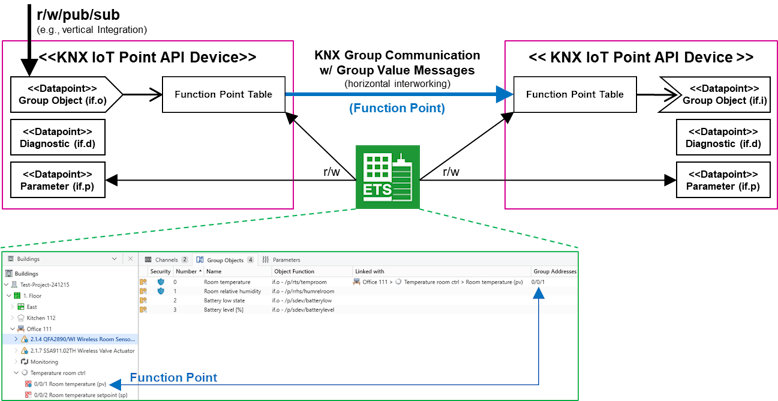
The diagram also illustrates vertical integration capabilities, where 3rd party devices can directly access individual datapoints using RESTful CoAP mechanisms (read/write/pub/sub). ETS uses this same datapoint access capability for device commissioning, allowing it to read and write device parameters and Function Point Table configurations using standard CoAP requests. This unified approach means that both horizontal group communication and vertical integration leverage the same underlying protocol stack.
KNX Installation Configuration Example w/ DCA
The diagram below shows an installation with a KNX IoT area that includes Ethernet‑connected controllers, one or more Thread stub networks, and a KNX Classic device connected via TP. ETS (Engineering Tool Software) manages the network, device and group communication configuration. As part of ETS, installers use a Thread BR DCA (Device Configuration App), a manufacturer-specific extension for ETS, to configure the Thread Border Router and the underlying Thread subsystem.
Through ETS, installers configure KNX IoT devices to interact directly with one another. This direct device-to-device configuration enables devices to transmit S-Mode messages straight to their recipients using either multicast or unicast IPv6 communication, ensuring efficient and low-latency interaction.
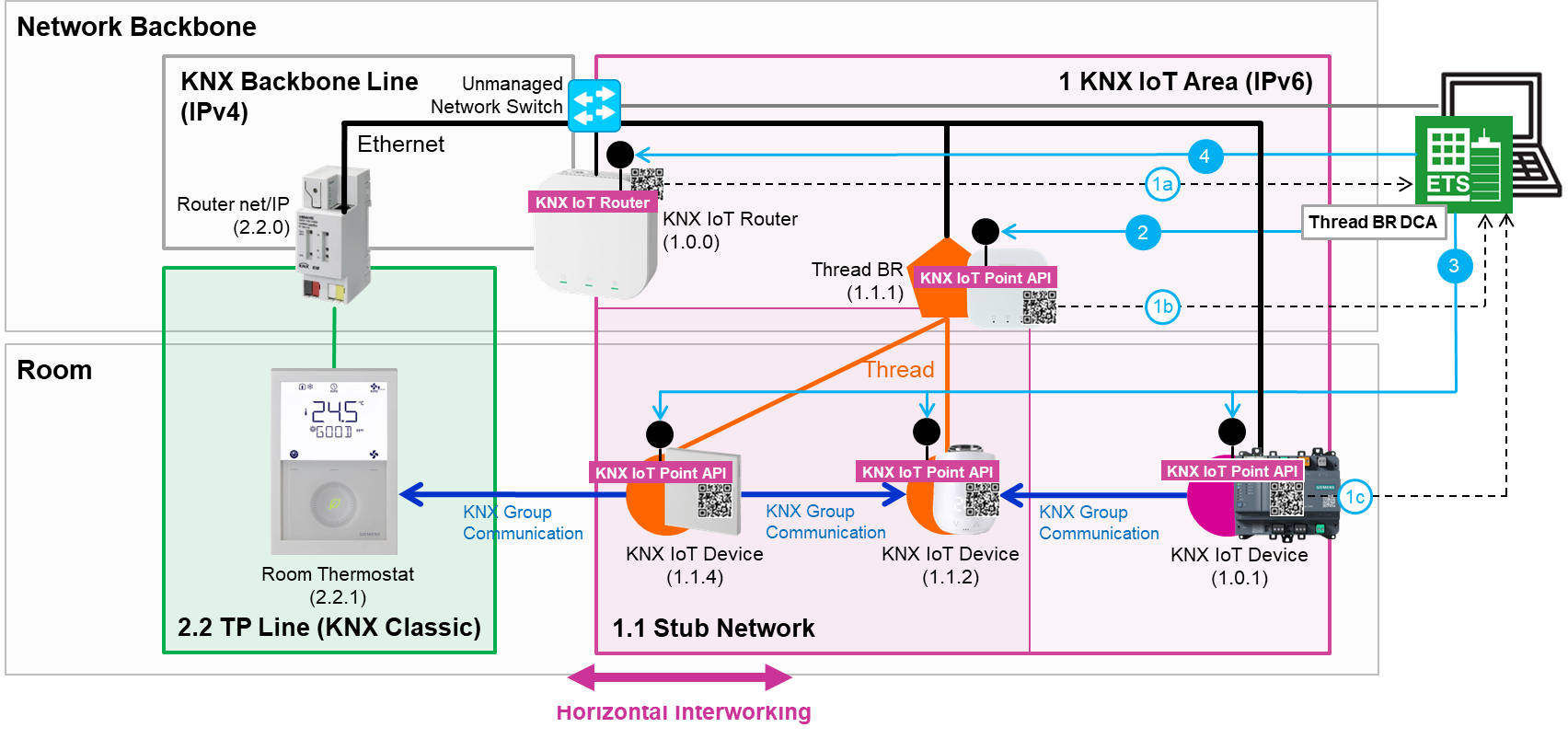
To configure such a KNX system, the installer typically follows these steps:
- Scan Product Barcode (DMC or QR Code): The installer scans the device product information using ETS and assigns the specific physical device (identified by serial number) to a KNX individual address within the ETS project.
- Configure Thread Network: The installer configures the Thread Border Router and the Thread subsystem using the product-specific DCA. Additionally, the installer assigns each Thread device to the appropriate Thread network.
- Configure KNX IoT Device: The installer configures Group Addresses and parameters in ETS and downloads this configuration to the device.
- Configure KNX IoT Router: The installer configures the Group Addresses required for communication with classic KNX devices and downloads the configuration to the router.
- KNX IoT Group Communication (S-Mode): Once step 3 is complete, the device enables sending group messages to other KNX IoT devices.
- KNX IoT/Classic Group Communication (S-Mode): Once step 4 is complete, KNX IoT and KNX Classic devices can exchange messages seamlessly.
Network Topology
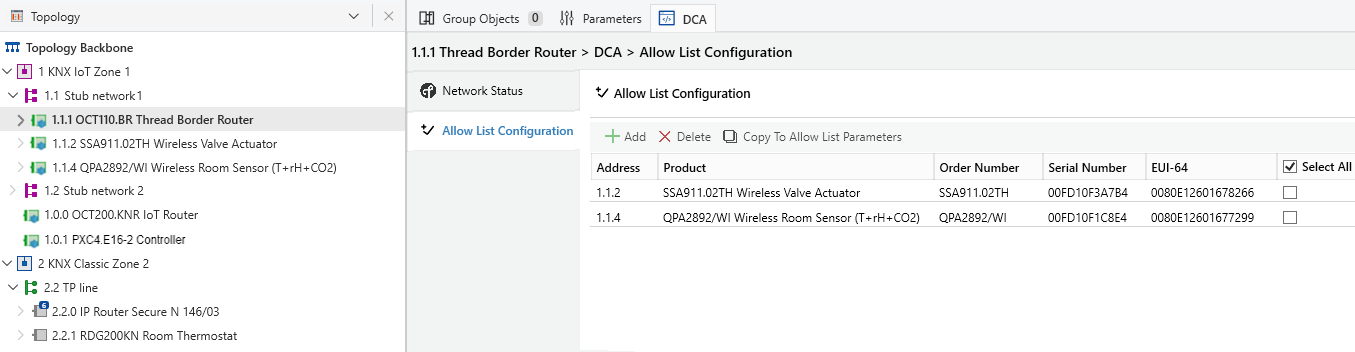
In ETS, installers can organize a KNX system into distinct network zones. One example is the division between a KNX Classic Zone and a KNX IoT Zone, as depicted in the following picture. Installers can further subdivide the KNX IoT Zone, such as by creating a grouping of Thread devices within a Thread stub network. By using the Thread BR DCA, installers can configure an accept list to enable devices to join the Thread network.
This configuration of network zones serves as the foundation for Horizontal Integration and network segmentation, facilitating the establishment of distinct cybersecurity zones. See Zero Trust Principles & Network Segmentation for the underlying concept.
RESTful Data Request Examples
The following examples demonstrate how to interact with KNX IoT devices using CoAP requests. These examples use the CBOR format, which is the standard for efficient CoAP communication in KNX IoT.
KNX Group Communication
KNX group communication uses unicast or multicast messages sent to the /k endpoint. This enables simultaneous control of multiple devices listening to the same Group Address. For efficiency, CBOR is the standard encoding for these messages, where the protocol maps keys to integers.
Request:
POST coap://[ff35:30:...]/k
Content-Format: application/cbor
Payload (CBOR notation):
{
  4: 1104,
  5: {
    6: 1,
    7: 1190,
    1: 21.5
  }
}
- CBOR Key 4 ("sia"): Source Individual Address (for example,
1.1.4->1104) - CBOR Key 5 ("s"): S-Mode messages
- CBOR Key 6 ("st"): Service Type (where
1= Write) - CBOR Key 7 ("ga"): Destination Group Address
- CBOR Key 1 ("value"): The value that the sender transmits