Device Onboarding Barcode
KNX IoT devices use barcodes to streamline the device onboarding process. These machine-readable barcodes contain device information that a MaC like ETS can scan to automatically identify devices and retrieve their credentials. This automated approach eliminates manual data entry and reduces configuration errors during installation.
Barcode in the Commissioning Flow
The MaC scans the device barcode during the discovery step of onboarding. See Device Bootstrapping for the full commissioning sequence.
Barcode Types
Data Matrix Codes (DMC) and QR codes (Quick Response code) are types of two-dimensional barcodes. Electronic devices such as mobile device cameras or barcode readers can capture the encoded data. In KNX IoT installations, the device manufacturer generates a barcode and prints it directly on the device. During commissioning, the installer scans the device barcode with a MaC to onboard the device into the KNX installation.
ISO 15418 Encoding Standard
The ISO 15418 standard specifies Data Identifiers for encoding data in barcodes. This standard uses alphanumeric strings suitable for DMC and QR code encoding. The encoded string uses prefixes to identify different data fields, with each field separated by the + character (format separator) as defined in the ISO 15418 standard.
Example structure:
31    QMX3
+43S  00FD10F1F1FE
+3Z   EUI:0080E126030A980A.P:PASSWORD
The + character precedes each Data Identifier (except the first field) to mark the boundary between data elements.
Barcode Content
Device onboarding barcodes printed directly on KNX IoT devices must contain the following information for the commissioning process:
- Model identifier: Device type and model information
- Serial number: Unique KNX device identifier
- EUI-64: IEEE 64-bit Extended Unique Identifier
- Password: Commissioning credential for secure device enrollment
The ISO 15418 prefix 3Z contains manufacturer-specific information with multiple fields separated by periods (.), including the EUI-64 and password.
Example with KNX IoT device information:
31P  OCT100.BR
+41S 00FD10F1D07F
+3Z  EUI:0080E126016CF011.P:ABC123
Resulting barcode string:
31POCT100.BR+41S00FD10F1D07F+3ZEUI:0080E126016CF011.P:ABC123
DMC Example:

QR-Code Example:
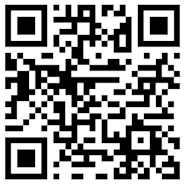
Field Definitions
| Prefix | Description | Example | Notes |
|---|---|---|---|
| 31P | Model identifier | OCT100.BR | Device type and model information |
| 41S | KNX serial number | 00FD10F1D07F | 12 character hexadecimal (uppercase) |
| 3Z | Custom data | Multiple fields | See below |
Hexadecimal Formatting Convention
All hexadecimal values in serial numbers and EUI-64 identifiers shall use uppercase formatting (A-F) for consistency. For example, use 00FD5F00002E instead of 00fd5f00002e.
3Z Field Components
The 3Z prefix contains manufacturer-specific onboarding information with fields separated by periods (.):
- EUI: EUI-64 identifier (IEEE 64-bit Extended Unique Identifier)
- P: Network password (Thread joining credential or default commissioning credential)
- PA: Application password for SPAKE2+ authentication
Application Password Fallback
If the PA field is not present in the barcode, a MaC must use the P field value for both network access and application authentication.