Smart Linking
Overview
The document provides an overview of how to apply Smart Linking in the context of HBES/BACS (Home and Building Electronic Systems / Building Automation and Control Systems). It describes a practical implementation using the Home and Building Electronic Systems Information Model [EN50090-6-2]. The focus is on KNX technology.
Smart Linking uses semantic data to enable seamless system integration throughout the lifecycle of KNX-based systems. It covers product development and manufacturing through commissioning and operation. This document explains data point annotations, group address composition, application function deployment, and latest developments used in the KNX ecosystem. It serves device manufacturers, developers, system integrators, product managers, and business leaders.
Purpose and Scope
Smart Linking establishes connections between input and output Points (Group Objects) through a two-phase process involving manufacturers, system integrators and installers.
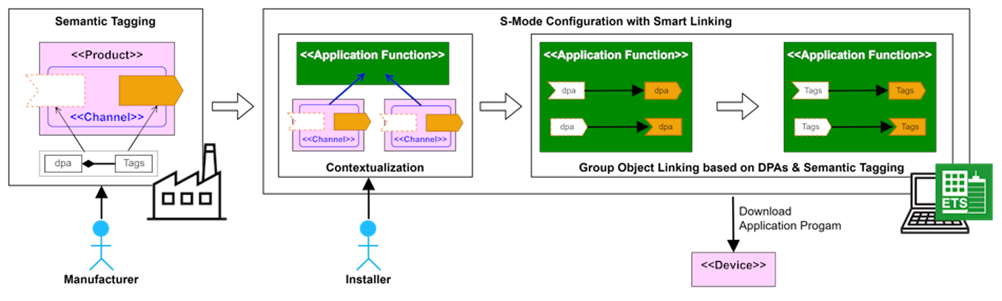
Manufacturing Phase: Manufacturers assign Data Point Annotations (DPAs) to each input or output Point and, sometimes, to parameters. Standardized DPAs have predefined Tags and TagSets (Quality Kind and Operation Kind). Manufacturer-specific Points require custom Tag definitions. These DPAs are part of the product description within the ETS product database.
Commissioning Phase: During commissioning, system integrators or installers assign Points or Channels (groups of Points) to specific contexts such as Application Functions or Locations. This contextual assignment is important. It significantly reduces the number of potential linking candidates.
The linking method depends on DPA availability:
- DPA-based Linking: When all Group Objects have standardized DPAs, the system directly links inputs with outputs that share identical DPAs.
- Semantic Linking: When DPAs are unavailable, do not match or are manufacturer-specific, the system compares Tags between input and output Points to determine potential matches.
Contextualization
Contextualization assigns specific context to Points or Channels based on their location and functional purpose within the system. This process groups Points across devices and significantly reduces potential linking candidates. Ideally, it creates precise one-to-one connections (Function Points) between inputs and outputs. The following entities are important for the Smart Linking process (see [EN50090-6-2] for detailed descriptions):
- Device: Equipment containing firmware, Functional Blocks, and Points
- Functional Block: Software representing device functionality
- Point: Interface for device data interaction (Group Object)
- Channel: Manufacturer-defined grouping of Points from one or more Functional Blocks
- Location: Physical place (room, area, position) within or outside a building
- Application Function: Control system functionality containing Points from multiple devices
- Function Point: Communication link grouping input/output Points across devices
In the following example, the installer assigns a Channel "Room Temperature Controller" to Application Function "Room Heating Control" in "Office 143." Smart Linking now compares only Points associated with Channels having an "isChannelOf" relationship to the "Room Temperature Control" Application Function. This ensures Smart Linking links only relevant Points.
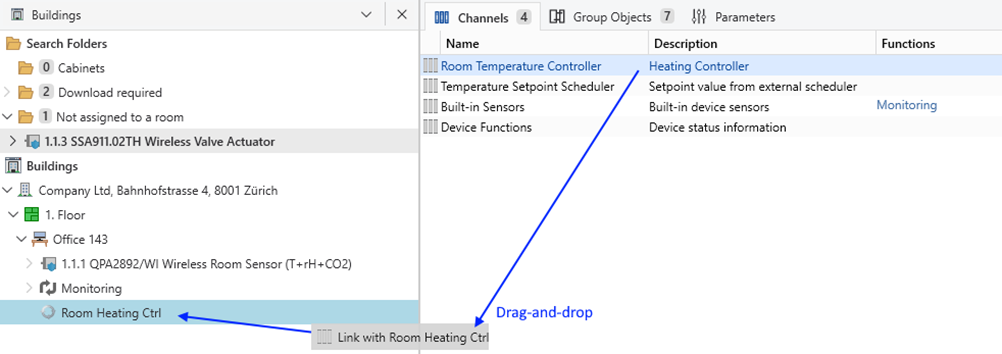
This creates the following semantic relationships as defined in [EN50090-6-2]:
| Subject | Predicate | Object |
|---|---|---|
| Location "Office 143" | hasApplicationFunction | "Room Heating Control" Application Function |
| Channel "Room Temperature Controller" | isChannelOf | "Room Heating Control" Application Function |
| Device 1.1.3 "SSA911.02TH" | isEquipmentOf | Location "Office 143" |
Application Functions and Device Functionality Mapping
The KNX Standard (Volume 7) defines Functional Blocks (device functionality) across different application fields. It specifies their functionalities and how they interwork with one another. [EN50090-6-2] enables mapping each Functional Block to one or more Application Functions. This mapping is essential for contextualization. It enables the assignment of Points from a Functional Block to their corresponding Application Function during commissioning.
The following sections show examples for the mapping between KNX Functional Blocks (Device Functionality) and Application Functions organized by trade, providing the foundation for Smart Linking in various application fields:
Lighting
| Application Function | Trade | Device Functionality (FBs) |
|---|---|---|
| Light On/Off Switching (lightingOccupancyCtrl) | lighting | Light Switching Actuator, Light Switching Sensor Basic, Priority Sensor, Lock Sensor |
| Time-controlled Light Switching (scheduler) | - | On/Off Scheduler, Timed Sensor |
| Light Dimming (lightingDaylightCtrl) | lighting | Light Dimming Actuator, Light Dimming Sensor |
| Dimmed Color Light (lightingDaylightCtrl) | lighting | Color Actuator RGB(W), Color Setting Sensor RGB(W), Color Temperature Actuator, Color Temperature Sensor, Color Setting Sensor xyY |
| Weather Sensors (lightingTwilightCtrl) | lighting | Daylight Sensor |
Shading
| Application Function | Trade | Device Functionality (FBs) |
|---|---|---|
| Blinds (blindCtrl) | shading | Sunblind Actuator, Shutter Actuator |
| Time-controlled Blinds Moving (scheduler) | - | Up/Down Scheduler |
| Solar Protection (solarProtectionCtrl) | shading | Sunblind Actuator, Shutters, Sun Position Sensor |
| Weather Protection (weatherProtectionCtrl) | shading | Wind Sensor, Rain Sensor, Frost Sensor |
Electrical (Equipment Control)
| Application Function | Trade | Device Functionality (FBs) |
|---|---|---|
| General Purpose Switching, Socket Switching (switchCtrl) | electrical | Any On-Off |
Room Air Temperature Control (Energy Control / Emission Control)
| Application Function | Trade | Device Functionality (FBs) |
|---|---|---|
| Fan Coil Control (fanCoilCtrl) | heating cooling ventilation | Fan Actuator, Fan Speed Setting, Room Temperature Sensor, HVAC Valve Actuator |
| Variable Air Volume Control (vavDamperCtrl) | heating cooling ventilation | Air Damper Actuator, Room Temperature Sensor, Air Temperature Sensor |
| Room Heating Control (radiatorCtrl) | heating | HVAC Valve Actuator, Room Temperature Sensor |
| Heating Radiator Control (convectorRadiatorCtrl) | heating | HVAC Valve Actuator, Room Temperature Sensor |
| Radiant Ceiling Control (radiantCeilingCtrl) | cooling (heating) | HVAC Valve Actuator, Room Temperature Sensor, Dewpoint Sensor |
| Radiant Underfloor Control (radiantUnderfloorCtrl) | heating (cooling) | HVAC Valve Actuator, Room Temperature Sensor |
| Scheduler (scheduler) | heating cooling ventilation | HvacMode Scheduler, Temperature Scheduler |
| Weather Sensors (weatherStation) | - | Outside Temperature Sensor |
Metering (Monitoring)
| Application Function | Trade | Device Functionality (FBs) |
|---|---|---|
| Metering (meter) | metering | Generic Meter, Gas Meter |
| Sub Metering Electricity (meter) | metering electrical | Electricity Meter |
| Sub Metering Heating/Cooling (meter) | metering heating cooling | Water Meter, Heat Cost Allocator, Heat Meter |
Plant Management
| Application Function | Trade | Device Functionality (FBs) |
|---|---|---|
| Time Synchronization | - | System Clock |