KNX Group Communication
KNX IoT Point API supports three types of message exchanges for group communication (S-Mode): multicast message exchange, direct unicast message exchange, and endpoint subscription message exchange. A Mac (such as ETS) configures these patterns through the Function Point Table, enabling flexible device-to-device communication depending on the application requirements.
KNX group communication facilitates runtime interworking between devices using an event-driven approach. Devices send messages only when a status change or event occurs. This approach minimizes unnecessary communication and reduces power consumption. Messages exchanged between devices include the source device, group address, communication type (read, write, or response), and the associated datapoint value.
Direct Unicast Message Exchange
Direct unicast message exchange facilitates one-to-one communication using the specific IPv6 unicast address of the recipient. One device sends a CoAP message directly to another device, ensuring reliable and confirmed data exchange. Applications include:
- Direct device control requiring confirmation (for example, adjusting a single actuator)
- Commands to specific devices requiring reliable delivery
- Reading values from individual devices
Example: A temperature sensor (Individual Address 5678) transmits a value change using a unicast IPv6 message to a controller (Individual Address 5699). The controller confirms receipt and processes the new temperature value.
The figure below illustrates Direct Unicast Message Exchange containing a controller device and peripheral devices with either sensor or actuator functional blocks.
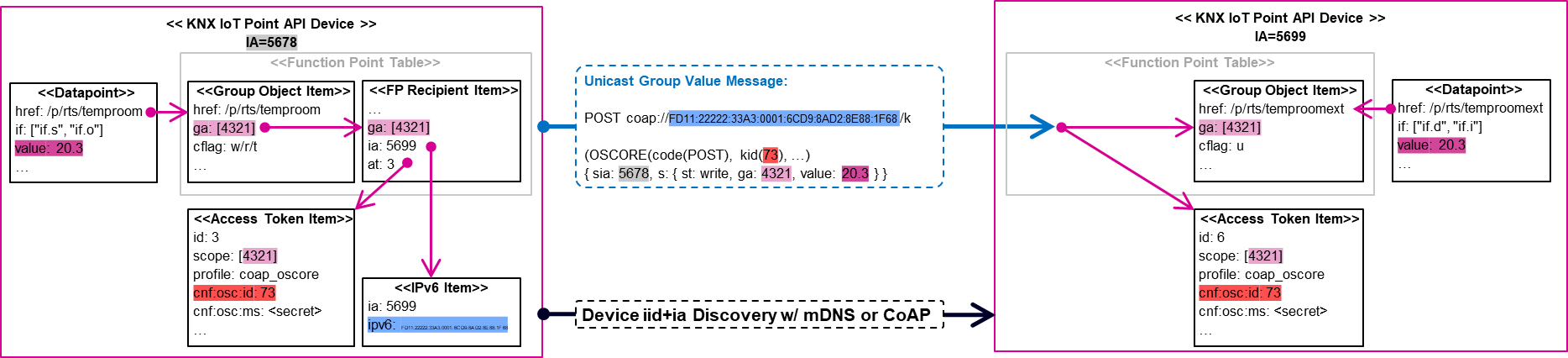
Function Point Recipient Item: The system links the Datapoint to the Group Object with matching href (resource path). The connections between Function Point Recipient Item and Group Object Table Item work identically for unicast and multicast configurations. For unicast message exchange, the configuration uses at (at=3) to link the Function Point Recipient Item with the Access Token. The Function Point Recipient Item also includes the recipient's Individual Address (ia=5699). During initial transmission or when the recipient's IPv6 address changes, the sending device resolves the IPv6 address using mDNS or CoAP. The system stores the resolved IPv6 address with the Individual Address for future transmissions in the IPv6 Item.
Unicast Group Value Message: The system uses the IPv6 unicast address from the IPv6 Item as the destination address. The payload contains the same information as in multicast examples.
Function Point Publisher Item: Direct Unicast Message Exchange does not require a Function Point Publisher Item on the receiving side. The system uses the OSCORE key id (kid) that matches an access token to decrypt the message and validate group address access rights (scope=[4321]). After successful validation, the system writes the value to the Datapoint associated with the matching Group Object Table Item.
Multicast Message Exchange
Multicast message exchange enables a single device to send messages to multiple devices simultaneously using an IPv6 multicast address. A sender selects the destination group through the Recipient Table (/fp/r) by setting the multicast grpid. A device that wants to receive multicast traffic registers the relevant Group IDs in the Publisher Table (/fp/p).
The receive-side decision follows the Group Object cflag. If a datapoint has a receive-related flag, such as Write (W), Update (U), or Read (R), the device treats the Group Address as an incoming multicast target. The device then joins the corresponding multicast group. Only devices with a matching registration receive the message, which keeps group communication efficient and avoids broadcast-like delivery. Applications include:
- Group-wide actions (for example, turning on all lights in a room)
- Scene activation across multiple devices
- Thread-based deployments where multicast targets only the relevant groups and reduces unnecessary wake-ups for sleeping devices
Example: A temperature sensor (Individual Address 5678) sends a value change using a multicast IPv6 message. Multiple devices receive the notification simultaneously and update their states accordingly. In a Thread-based installation, this pattern keeps multicast traffic scoped to the relevant group and reduces unnecessary wake-ups for sleeping devices.
The figure below shows a Multicast Message Exchange example between a light switch and light actuator.
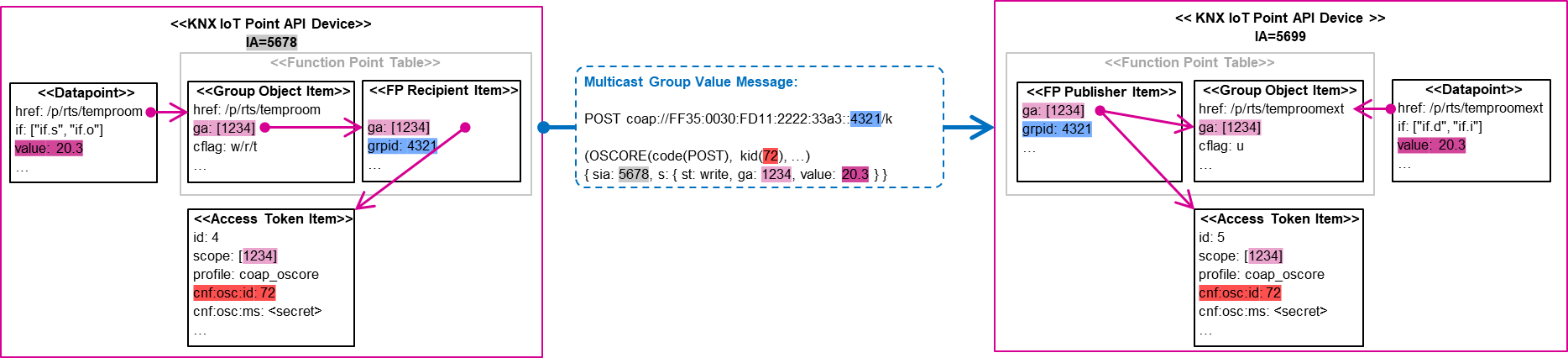
Function Point Recipient Item: On the sender side, the system associates the Datapoint with the Group Object Table Item that shares the same href (resource path). The system connects this Group Object Table Item to one or more Function Point Recipient Items with the same Group Address (ga=1234). The Group Address locates the corresponding Access Token Item (scope=Group Address), which contains OSCORE credentials to encrypt the Group Value Message.
Multicast Group Value Message: The IPv6 multicast address has two parts. The first part remains fixed and includes the IPv6 multicast prefix and KNX system installation ID. The second part derives from the group ID (grpid) in the Function Point Recipient Item. ETS configures the grpid to represent either a single Function Point or to transmit multiple Function Points via the same IPv6 multicast address. The Group Value Message includes the sia (source Individual Address), service type (st), Group Address (ga), and the value from the sender's Datapoint.
Function Point Publisher Item: On the receiving side, the system extracts OSCORE credentials (OSCORE recipient context) from the Multicast Group Value Message. These credentials identify and locate the associated Access Token (kid=71) within the Access Control List. If the credential (AES key from a pre-shared symmetric secret) matches the Access Token Item settings, the system decrypts the message. After decryption, the system verifies access rights by checking that the scope attribute includes the corresponding Group Address. After successful validation, the system writes the value to the Datapoint associated with the Group Object Table Items matching the configured Group Address (with the same href).
Endpoint Subscription Message Exchange
Endpoint subscription message exchange enables a receiving device to subscribe to changes from a sender through the CoAP Observe mechanism (observe on /k). When a resource changes, the server automatically sends notifications with the sender's updates to all subscribed clients. Applications include:
- Monitoring datapoints that change frequently
- Event-driven architectures
- Reducing polling or re-subscribing overhead for real-time updates
Example: A visualization system subscribes to a temperature sensor using the CoAP Observe mechanism. When the temperature changes, the sensor automatically pushes the new value to the visualization system.
A controller Point API device or KNX IoT Router (Individual Address 5699) initiates a CoAP Observe request to subscribe to a sensor (Individual Address 5678). The sensor responds by sending Datapoint values via CoAP notifications each time a point change occurs.
The figure below illustrates Endpoint Subscription Message Exchange with a controller device and peripheral devices containing either sensor or actuator functional blocks. The controller initiates the subscription request (CoAP Observe), creating a star-shaped communication pattern. Group Value messages reach the subscriber through CoAP Observe notification messages.
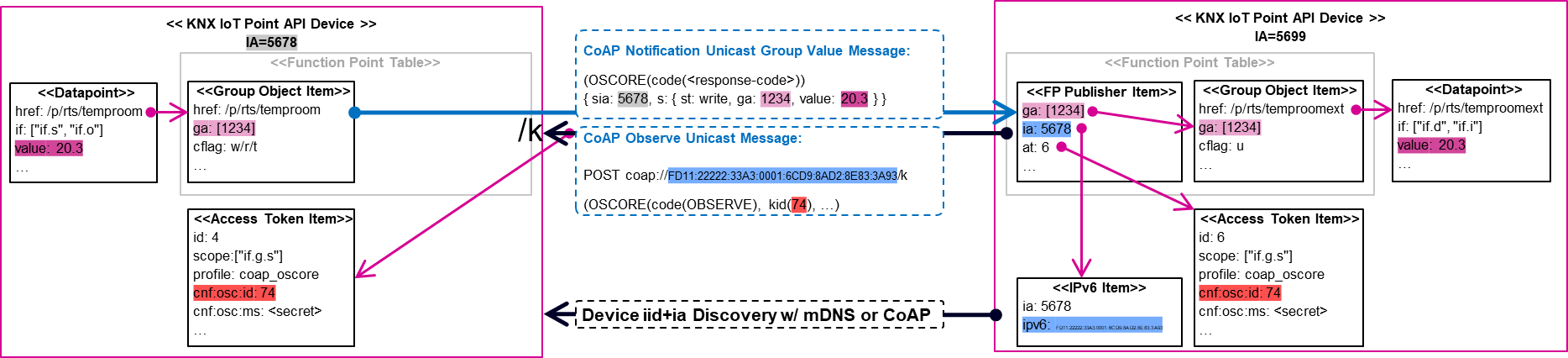
The Function Point Publisher Table sits on the receiving side for Group Value Messages. This applies to both Multicast and Endpoint Subscription. For Endpoint Subscription, this table contains the configuration. The CoAP subscription initiator operates on the receiver side (ia=5699).
Function Point Publisher Item (subscription): The initiator device resolves the IPv6 address of the Group Value Message sender using mDNS or CoAP. This occurs unless the system already resolved and stored the address in the IPv6 Item. The Function Point Publisher Item contains the Individual Address (ia=5676) of the initiator device.
CoAP Observe Unicast Message: After successful address resolution, the initiator device subscribes to the KNX group communication endpoint (/k) on the Group Value Message sender (ia=5678). The system encrypts a CoAP Observe Unicast Message request with OSCORE credentials from the Access Token (at=6). The Function Point Publisher Item references this token.
Access Token Item: On the receiving side, the system checks the Access Control List for an Access Token Item with corresponding OSCORE credentials (cnf.osc.id=kid). When the kid from the CoAP message matches, the system uses the secret (pre-shared symmetric key) from the Access Token Item. This secret decrypts the message and validates permissions in the scope attribute.
CoAP Notification Unicast Group Value Message: The Group Value message sender responds when value changes occur. It sends all configured group objects to the subscriber. The system sends only changes for Datapoints with associated Group Object Table Items. The Transmit Flag must enable transmission. The sending Group Address must appear in the Access Token scope. In the example, the access scope uses if.g.s to transmit all configured Group Objects.
Function Point Publisher Item (notification): On the receiving side, the Access Token scope (referenced in the Function Point Publisher Item) also sets to if.g.s. This grants access to all Group Addresses. However, the system writes values to Datapoints only when the Group Address appears explicitly in Function Point Publisher Items and the corresponding Group Object Table Items (ga=1234).
3rd Party Endpoint Subscription Message Exchange
3rd party endpoint subscription extends the subscription message exchange pattern to include an intermediary device or gateway. This pattern enables secure communication scenarios where direct connectivity is not available or when different cybersecurity zones require additional security layers. Applications include:
- Cloud integration through a gateway
- Cross-network communication spanning multiple segments
- Vertical integration with 3rd party systems
- Adding security validation layers between devices
- Bridging different security domains
Example: A HEMS (Home Energy Management System) subscribes to a KNX IoT Router's group communication endpoint (/k). After configuring access rights and LDevID certificates, the HEMS establishes a mutual authenticated TLS session. The router forwards Group Value messages securely to the HEMS when datapoint values change.
The figure below depicts a 3rd party HEMS integrating a KNX system through KNX IoT Router using TLS.
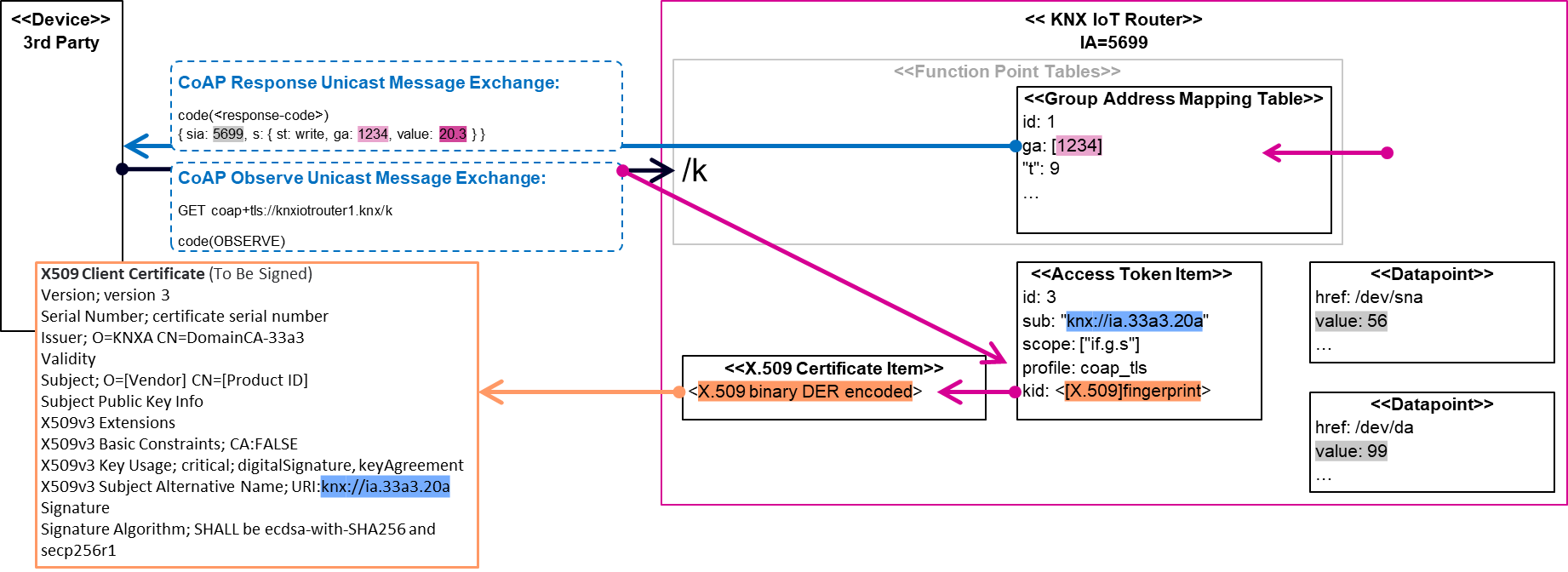
Access Token Item: The KNX IoT Router has an access token that includes an X.509 certificate in its trust list (auth/crts). The system uses this certificate for authentication and authorizes the 3rd party client to access all Group Value messages (scope=if.g.s). These messages originate from either KNX Classic or KNX IoT systems.
3rd party Client Subscription: A non-KNX client subscribes to the KNX group communication endpoint (/k) on the KNX IoT Router. The system configures the endpoint and corresponding Access Token to enable vertical integration. The 3rd party client receives all messages transmitted through the KNX IoT Router when appropriate permissions exist in the access token.
Group Address Mapping Table: With if.g.s, the 3rd party client receives all messages in the Group Address Mapping Table. The scope can also use group addresses to selectively send Group Value messages to the client (commonly called a security proxy). The client can also send Group Value messages to the KNX IoT Router using Direct Unicast Message Exchange.