Credential Model (EN50090-6-2)
Overview
Credentials play a vital role in ensuring cybersecurity of a building automation system. Devices use them for bootstrapping to verify the origin of the device, and during runtime to facilitate confidentiality and authenticate its authenticity. This specification aims to define the different credential entities and their relationships. The basic entities of the credential model are the Issuer, Credential, Credential Subject, and Verifier.

A Credential typically includes information about the subject's identity (for example, serial number or user name) and the authority that issued it. It also includes the credential type (for example, X.509, Shared Secret, etc.) and specific properties asserted by the authority. Additionally, it contains constraints such as the validity period.
The Credential Subject includes properties referenced by Credential claims. These properties may link to a credential holder, such as a user, product, or device (Asset). The credential holder stores the Credentials securely.
The Issuer asserts claims about one or more subjects (for example, device serial number). It creates a credential based on these claims and transmits it to a credential holder (for example, a device). This process can occur during various stages, such as the device production in a factory.
The Verifier, for example, the ETS tool, receives one or more credentials and validates them (for example, by checking the signature). It also verifies the ownership of the credential holder (Credential Subject). For instance, the tool verifies the Credential by checking if a specific manufacturer issued it. It also checks if its serial number is on the allowed list before integrating the device into the building automation system.
Credentials
Building automation systems use several types of credentials at different stages to provide secure access and facilitate data exchange. The picture below illustrates the common digital credential types employed in this context. These include X.509 certificates, Access Tokens, Shared Secrets, and Barcodes. These credentials authenticate and authorize individuals or devices, granting them access to information and enabling them to perform specific actions.

The cred namespace defines the generic concepts or entities of the credential model presented earlier. The knxcred namespace defines more specific KNX-driven concepts. Same distinctions as done elsewhere in the ontology, like for example between core classes and knx classes.
Installation Example
KNX Classic Network
In a KNX Classic system, the process of onboarding a device involves the use of a Barcode that contains a secret. The system uses this secret for establishing the initial connection and authentication between the device and the commissioning tool (ETS). By leveraging this secret, the device can be securely onboarded, ensuring a trusted and reliable integration into the system.
Once the onboarding process is complete, a second step involves the configuration of a Shared Secret for runtime communication. This shared key serves as a cryptographic element that facilitates secure group communication within the system. It enables devices to exchange data and interact within specific groups, ensuring confidentiality and integrity of the transmitted information.
The picture below shows the Function Point, which represents a group object within the KNX Classic system. This group object contains the corresponding Shared Secret for group communication. By associating the shared key with the group object, devices can participate in secure and efficient group communication.

KNX IoT Network
In a KNX IoT system, the process of onboarding a device typically needs a barcode (DMC or QR code) that contains a passcode. This passcode serves as a means for device authentication. By using this passcode, the device undergoes a secure onboarding process, establishing a encrypted connection with the commissioning tool (ETS).
Once the authentication is successfully completed, a subsequent step involves the configuration of a Shared Secret for runtime communication (KNXOscoreSharedSecret). This Shared Secret acts as a cryptographic element that facilitates secure group communication within the system. It enables devices to exchange data and interact within specific groups, ensuring the confidentiality and integrity of the transmitted information.
The picture below showcases the Function Point, which represents a group object within the KNX IoT system. This group object contains the corresponding pre-shared OSCORE key for secure group communication. In scenarios where a message transfers from a KNX Classic system to a KNX IoT system, the Function Point has a relationship with both an KNXOscoreSharedSecret and a KNXSecureSharedSecret. This ensures the secure and authenticated exchange of messages between the two systems, maintaining the integrity and confidentiality of the communication.

The frames mark the entities appearing in the preceding diagram with a sticker E. Count the ones without a sticker as instances (or individuals as in the common ontology naming jargon).
Group Key JSON-LD Project Export
The tool export process utilizes the credential model, in combination with the core, location, tagging, and KNX models. This combination facilitates the seamless integration of a KNX system into diverse applications, including visualizations or gateways. It enables the efficient transfer of data, configuration, and cybersecurity settings from one ecosystem to another, guaranteeing smooth communication and compatibility between disparate systems.
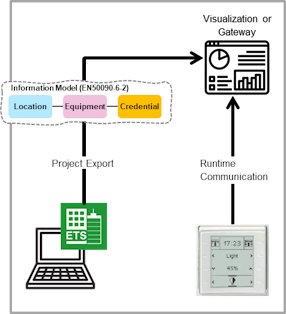
Verbose example:
The JSON-LD example presented below shows different entities used in a message exchange between a KNX Classic system and a KNX IoT system. This example contains a FunctionPoint, configured with both a KNX Classic Shared Secret and a KNX IoT Shared Secret. This configuration enables bidirectional communication between the two ecosystems, ensuring seamless interoperability.
{
    "@context": {
        "dct": "http://purl.org/dc/terms/",
        "core": "http://schema.knx.org/2023/en50090-6-2/core#",
        "cred": "http://schema.knx.org/2025/en50090-6-2/cred#",
        "knx": "http://schema.knx.org/2020/ontology/knx#",
        "knxcred": "http://schema.knx.org/2025/ontology/knxcred#",
        "prj": "https://prj.knx.org/977a1454-ff4f-4670-92bc-a003cb651eda#"
    },
    "@graph": [
        {
            "@id": "prj:GA_111",
            "@type": "knx:FunctionPoint",
            "dct:title": "Current temperature (pv)",
            "knx:groupAddress": "2024",
            "core:groups": [
                {
                    "@id": "prj:SwitchOnOffIn"
                },
                {
                    "@id": "prj:SwitchOnOffout"
                }
            ]
        },
        {
            "@id": "prj:Key_1000",
            "@type": "knxcred:KNXSecureSharedSecret",
            "cred:validFrom": "2024-05-24T04:03:29.0561207Z",
            "cred:isSharedSecretOf": {
                "@id": "prj:GA_111"
            },
            "knxcred:key": "MyRJQWft6X1LJBZrBRz7SA=="
        },
        {
            "@id": "prj:Key_2000",
            "@type": "knxcred:OscoreSharedSecret",
            "cred:validFrom": "2024-05-24T04:03:29.0561207Z",
            "cred:isSharedSecretOf": {
                "@id": "prj:GA_111"
            },
            "knxcred:id": "0101",
            "knxcred:alg": "AES-CCM-16-64-128",
            "knxcred:hkdf": "SHA-256",
            "knxcred:masterSecret": "I8tJWGN1eLZDzjihw4Y57A=="
        }
    ]
}
Compact example:
The following JSON-LD example includes only the SharedSecrets from the previous example, excluding other entities like Function Points. This results in a more compact file. However, the relationship "cred:isSharedSecretOf" with "prj:GA_111" clearly indicates the project (prj:) to which the relation belongs, despite that it splits the semantic project export into multiple files. Additionally, the file can still match relationships with "@id" (remain stable) even if individual addresses or group addresses have changed in the corresponding project.
{
    "@context": {
        "core": "http://schema.knx.org/2023/en50090-6-2/core#",
        "cred": "http://schema.knx.org/2025/en50090-6-2/cred#",
        "knxcred": "http://schema.knx.org/2025/ontology/knxcred#",
        "prj": "https://prj.knx.org/977a1454-ff4f-4670-92bc-a003cb651eda#"
    },
    "@graph": [
        {
            "@id": "prj:Key_1000",
            "@type": "knxcred:KNXSecureSharedSecret",
            "cred:validFrom": "2024-05-24T04:03:29.0561207Z",
            "cred:isSharedSecretOf": {
                "@id": "prj:GA_111"
            },
            "knxcred:key": "MyRJQWft6X1LJBZrBRz7SA=="
        },
        {
            "@id": "prj:Key_2000",
            "@type": "knxcred:OscoreSharedSecret",
            "cred:validFrom": "2024-05-24T04:03:29.0561207Z",
            "cred:isSharedSecretOf": {
                "@id": "prj:GA_111"
            },
            "knxcred:id": "0101",
            "knxcred:alg": "AES-CCM-16-64-128",
            "knxcred:hkdf": "SHA-256",
            "knxcred:masterSecret": "I8tJWGN1eLZDzjihw4Y57A=="
        }
    ]
}
Barcode JSON-LD Project Import
The introduction of a tool import complements the tool export process. This feature seamlessly integrates device barcode information and enables users to assign or modify device locations during the scanning process, by using a mobile device. By combining various tools, this use case delivers substantial improvements to the overall efficiency of the commissioning process.
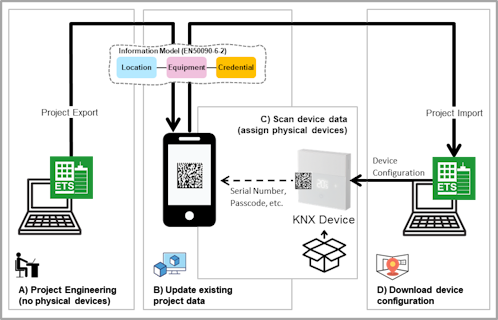
Verbose example:
In the following JSON-LD example contains 2 device with a barcode. This barcode contains the corresponding string, serving as an identifier for device onboarding. By using this barcode, the device can securely authenticate and establish a trusted connection with a tool.
{
    "@context": {
        "dct": "http://purl.org/dc/terms/",
        "core": "http://schema.knx.org/2023/en50090-6-2/core#",
        "loc": "http://schema.knx.org/2020/en50090-6-2/loc#",
        "cred": "http://schema.knx.org/2025/en50090-6-2/cred#",
        "knx": "http://schema.knx.org/2020/ontology/knx#",
        "prj": "https://prj.knx.org/977a1454-ff4f-4670-92bc-a003cb651eda#"
    },
    "@graph": [
        {
            "@id": "prj:Device_1234",
            "@type": "core:Device",
            "dct:title": "QFA2890/WI Wireless Room Sensor (T+rH)",
            "knx:individualAddress": "1201",
            "core:lastModified": "2024-05-24T04:03:29.0561207Z",
            "loc:isEquipmentOf": {
                "@id": "prj:Location_9876"
            }
        },
        {
            "@id": "prj:Barcode_2345",
            "@type": "cred:Barcode",
            "cred:validFrom": "2024-06-24T05:04:33.0561207Z",
            "cred:contentString": "31PQAA2890/WI+41S00FD10F1D6F0+3ZEUI:0080E126016CEEE8.P:JFW9GL0W",
            "cred:credentialSubject": {
                "@id": "prj:CredentialSubject_1234",
                "@type": "cred:CredentialSubject",
                "cred:holderAsset": {
                    "@id": "prj:Device_1234"
                }
            }
        },
        {
            "@id": "prj:Device_5678",
            "@type": "core:Device",
            "dct:title": "N 146/03 KNX IP-Router Secure",
            "knx:individualAddress": "1100",
            "core:lastModified": "2024-05-24T04:04:11.0861206Z",
            "loc:isEquipmentOf": {
                "@id": "prj:Location_9876"
            }
        },
        {
            "@id": "prj:Barcode_6789",
            "@type": "cred:Barcode",
            "cred:validFrom": "2024-06-24T05:04:33.0561207Z",
            "cred:contentString": "AAAQAYBOVWGLPFUD7ZKKTNGPKSXYFCTCQ7NS",
            "cred:credentialSubject": {
                "@id": "prj:CredentialSubject_5678",
                "@type": "cred:CredentialSubject",
                "cred:holderAsset": {
                    "@id": "prj:Device_5678"
                }
            }
        }
    ]
}
Compact example:
The JSON-LD example below includes only the Barcodes from the previous example, omitting other entities such as Devices. This leads to a more condensed file. Despite that it divides the semantic project export into multiple files, the relationship "cred:holderAsset" with, for instance, "prj:Device_5678" clearly indicates the project (prj:) to which the relation belongs. In this example, the barcode type is unknown, resulting in a missing contentType. To accommodate this, "@type" uses Barcode, showcasing the flexibility of the Credential model.
{
    "@context": {
        "cred": "http://schema.knx.org/2025/en50090-6-2/cred#",
        "prj": "https://prj.knx.org/977a1454-ff4f-4670-92bc-a003cb651eda#"
    },
    "@graph": [
        {
            "@id": "prj:Barcode_2345",
            "@type": "cred:Barcode",
            "cred:validFrom": "2024-06-24T05:04:33.0561207Z",
            "cred:contentString": "31PQAA2890/WI+41S00FD10F1D6F0+3ZEUI:0080E126016CEEE8.P:JFW9GL0W",
            "cred:credentialSubject": {
                "@id": "prj:CredentialSubject_1234",
                "@type": "cred:CredentialSubject",
                "cred:holderAsset": {
                    "@id": "prj:Device_1234"
                }
            }
        },
        {
            "@id": "prj:Barcode_6789",
            "@type": "cred:Barcode",
            "cred:validFrom": "2024-06-24T05:04:33.0561207Z",
            "cred:contentString": "AAAQAYBOVWGLPFUD7ZKKTNGPKSXYFCTCQ7NS",
            "cred:credentialSubject": {
                "@id": "prj:CredentialSubject_5678",
                "@type": "cred:CredentialSubject",
                "cred:holderAsset": {
                    "@id": "prj:Device_5678"
                }
            }
        }
    ]
}
Access Token JSON-LD Project Export (Tool Key)
The following example demonstrates access tokens along with their corresponding access scopes. A tool can use these access tokens to configure or reconfigure a device. In this example, each item links with an @id. However, one option to make the content more concise is to embed the SharedSecret into the AccessToken.
{
    "@context": {
        "cred": "http://schema.knx.org/2020/en50090-6-2/cred#",
        "knxcred": "http://schema.knx.org/2025/ontology/knxcred#",
        "prj": "https://prj.knx.org/977a1454-ff4f-4670-92bc-a003cb651eda#"
    },
    "@graph": [
        {
            "@id": "prj:AccessToken_9876",
            "@type": "knxcred:KNXSecureAccessToken",
            "cred:scope": "ToolKey",
            "cred:validFrom": "2024-05-24T05:04:33.0561207Z",
            "cred:credentialSubject": {
                "@id": "prj:CredentialSubject_9876",
                "cred:holderAsset": {
                    "@id": "prj:Device_5678"
                }
            },
            "cred:confirmedBy": {
                "@id": "prj:Key_1000"
            }
        },
        {
            "@id": "prj:Key_1000",
            "@type": "knxcred:KNXSecureSharedSecret",
            "cred:validFrom": "2024-05-24T05:04:33.0561207Z",
            "knxcred:key": "MyRJQWft6X1LJBZrBRz7SA=="
        },
        {
            "@id": "prj:AccessToken_9877",
            "@type": "knxcred:OscoreAccessToken",
            "cred:scope": "if.c, if.sec, if.swu, if.p, if.d",
            "profile": "coap_oscore",
            "cred:validFrom": "2024-05-24T05:04:33.0561207Z",
            "cred:credentialSubject": {
                "@id": "prj:CredentialSubject_9877",
                "cred:contextId": "0FB8",
                "cred:holderAsset": {
                    "@id": "prj:Device_1234"
                }
            },
            "cred:confirmedBy": {
                "@id": "prj:Key_2000"
            }
        },
        {
            "@id": "prj:Key_2000",
            "@type": "knxcred:OscoreSharedSecret",
            "cred:validFrom": "2024-05-24T05:04:33.0561207Z",
            "knxcred:id": "0101",
            "knxcred:alg": "AES-CCM-16-64-128",
            "knxcred:hkdf": "SHA-256",
            "knxcred:masterSecret": "I8tJWGN1eLZDzjihw4Y57A=="
        }
    ]
}
Firmware Package Example
The following example describes a Firmware Package Manifest, derived from an Application Manifest. The Firmware Manifest includes metadata about various files (Firmware Parts) and product (ApplicationProgram) required for updating device firmware. Additionally, it contains an attestation from the manufacturer, used by the Verifier (MaC) to confirm the correctness of the corresponding claims. Once verified, the Firmware Update tool can proceed with updating the device firmware.

The example below shows the previous diagram represented as JSON-LD. The Manifest includes a link to an attestation XML file. The XML file combines with metadata from the Manifest file and contains the corresponding signature. Additionally, the Manifest provides a link to the corresponding Application Program. By using the corresponding Application Program, it is possible to determine the relationship with the device (core:isApplicationProgramOf). This enables, for instance, the indication of a new firmware update availability for a device in an installation.
{
    "@context": {
        "core": "http://schema.knx.org/2023/en50090-6-2/core#",
        "cred": "http://schema.knx.org/2025/en50090-6-2/cred#",
        "dct": "http://purl.org/dc/terms/",
        "mac": "http://schema.knx.org/2020/ontology/mac#"
    },
    "@graph": [
        {
            "@id": "mac:M-00FD_ID10",
            "@type": "mac:FirmwarePackageManifest",
            "mac:FriendlyName": "QFA2890WI (V02.00.11)",
            "mac:FirmwareVersion": "02.00.11",
            "mac:PackageVersion": 7,
            "cred:issuer": {
                "@id": "mac:M-00FD"
            },
            "cred:validFrom": "2024-12-01T00:00:00Z",
            "mac:FirmwarePackageFile": "QFA2890WI_V03.05.03_SWU.knxfwp",
            "cred:credentialSubject": {
                "@id": "mac:CredentialSubject_M-00FD_10",
                "mac:HardwareReference": "00FD00050000000A",
                "cred:holderAsset": {
                    "@id": "mac:M-00FD_A-5002-06-407E"
                }
            }
        },
        {
            "@id": "mac:M-00FD_A-5002-06-407E",
            "@type": "core:ApplicationProgram",
            "dct:title": "QFA2890/WI",
            "mac:HardwareType": "AAUAAAAK",
            "mac:ApplicationNumber": "20482",
            "mac:ApplicationVersion": "6",
            "mac:MinEtsVersion": "6.3"
        }
    ]
}
Example of a "Manifest.xml" file as part of the "PackageName.knxfwp" file container:
<Firmware xmlns="http://knx.org/xml/firmware/10" FriendlyName="QFA2890WI (V02.00.11)" FirmwareVersion="02.00.11" PackageVersion="7" ProviderId="253">
    <Signature xmlns="http://www.w3.org/2000/09/xmldsig#">
        <SignedInfo>
            <CanonicalizationMethod Algorithm="http://www.w3.org/2006/12/xml-c14n11"/>
            <SignatureMethod Algorithm="http://www.w3.org/2001/04/xmldsig-more#rsa-sha256"/>
            <Reference URI="">
                <Transforms>
                    <Transform Algorithm="http://www.w3.org/2000/09/xmldsig#enveloped-signature"/>
                </Transforms>
                <DigestMethod Algorithm="http://www.w3.org/2001/04/xmlenc#sha256"/>
                <DigestValue>SVYova4/Tk7Hp77XaV/YPSwZhwRu8OnGa5y42hmQg5k=</DigestValue>
            </Reference>
        </SignedInfo>
        <SignatureValue>fKRwIYYMQxw5xIQMQG+Dc/kZMwbDUVj7sfK2r643yTaH3zU/iIzm2JHWZBu9P6aQGxGr2kxc/ED3KLgjt5cgB3TG2IGoh6dQUZOjN1Gqm0KJ7tQ9TQ3LlsOuTp9fIw4vh8yDpI+jVjmjiHZLDQnDRmhenGr6SgIaYsAvL+YKidr8QV9RqPgv8fMpT2sY4T9Riq5LiHGrghqG6IO/g22DPWS8XGnrm4fpMei64aLMKKi+vFr6JgPGA/EKJWw21BlPtU+xifZokkikBbL4nkZvOScbftPii2+JcuA7k9S14TpaIgn6sQF367GpK+M0nd0+g+Ocn7rIJf8UvyjhXbZ6Zw==</SignatureValue>
        <KeyInfo>
            <KeyName>M-00FD_K-1</KeyName>
        </KeyInfo>
    </Signature>
    <ApplicableTo>
        <ApplicableTo HardwareReference="00FD00050000000A"/>
    </ApplicableTo>
    <FirmwareParts>
        <FirmwarePart Identifier="00000000000000000000" Hash="72f31a962043eb1b90d85a122c414e72c2d776932f41b9e5d5f9817df65f40ee" FileName="QFA2890WI_V02.00.11_SWU.bin" Version="02.00.11"/>
    </FirmwareParts>
    <ApplicationCompatibility>
        <ApplicationProgram RefId="M-00FD_A-5002-06-407E" MinVersion="6" />
    </ApplicationCompatibility>
</Firmware>