KNX System Interworking
Runtime interactions enable communication and collaboration within the operational environment. These interactions group into two categories (see also Welcome Page): vertical integration and horizontal interworking. Vertical integration typically spans different PERA layers, cybersecurity zones or domains. Horizontal interworking usually occurs within a single PERA layer and cybersecurity zone. For additional information about PERA layers, consult the Purdue Enterprise Reference Architecture. While vertical integration focuses on coordinating activities across hierarchical levels, horizontal interworking emphasizes interactions among similar devices or systems operating at the same level.
Learn More About KNX System and Application Configurations
The Whitepaper-KNX IoT Basic Concepts provides a first overview regarding to the basic KNX IoT concepts. The Whitepaper KNX IoT System and Application Configuration provides further information regarding KNX System Interworking and application configuration. The Whitepaper KNX with Thread provides further information regarding the use of Thread as a transmission medium for KNX IoT.
KNX Network Topology
A KNXnet/IP router has an Ethernet interface on its primary side and a KNX TP or KNX IoT connection on its secondary side. In a KNX installation, IP networks can serve as the KNX Backbone and interconnect individual KNX areas and lines through KNXnet/IP routers. They forward KNX telegrams to other KNXnet/IP, KNX IoT Routers or directly to KNX IoT Point API devices using the routing method. Ethernet therefore acts as an additional transmission medium and makes a KNX system more flexible.
A KNX IoT Router complies with one profile: the KNXnet/IP profile or the Coupler profile. Each profile reflects the physical connection on the classic side of the product and determines how the router connects a KNX network to an Ethernet-based network. The illustration on the left below shows a larger KNX IoT system with a KNX IoT Backbone and a KNX IoT Router using the KNXnet/IP profile. The illustration on the right shows a KNX system with a KNX IoT Router using the Coupler profile between a KNX TP network and an Ethernet network.
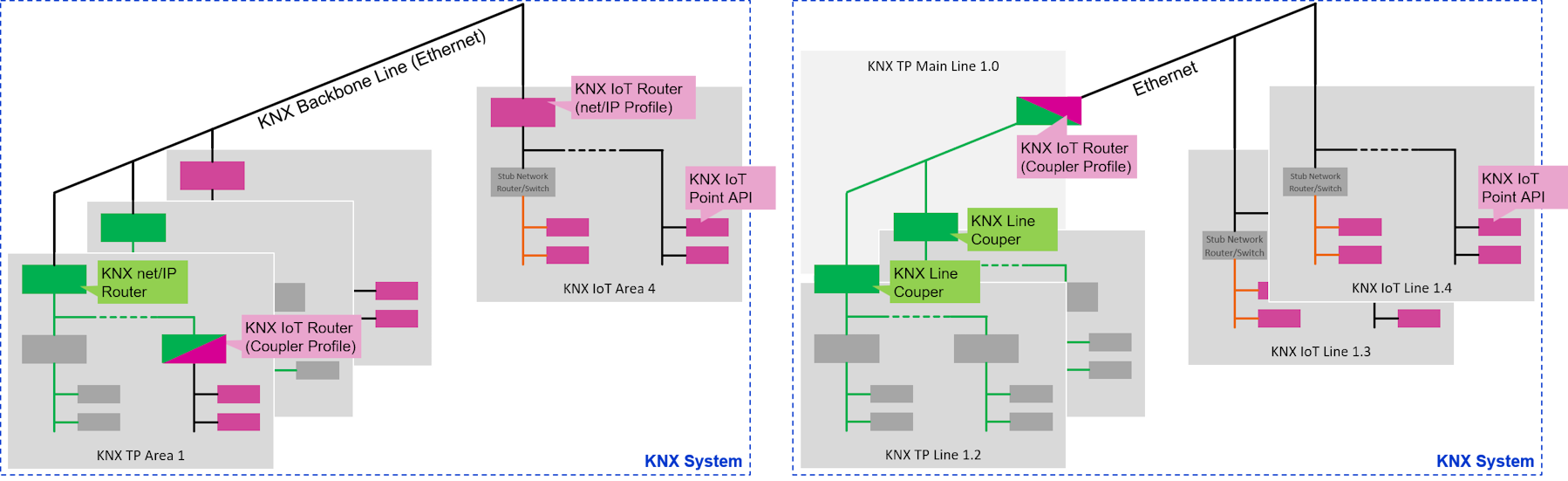 .
.
The KNX IoT subsystem contains two device profiles: the KNX IoT Point API profile and the KNX IoT Router profile.
-
KNX IoT Point API: A KNX IoT Point API device supports Group Object inputs and outputs. Users can configure these to exchange Group Value messages, enabling group communication from senders to receivers.
-
KNX IoT Router: The KNX IoT Router translates KNX IoT CBOR Group Value messages to the KNX Classic message format and vice-versa. The specification defines two KNX IoT Router profiles: KNX IoT Router KNXnet/IP profile and KNX IoT Router Coupler profile. A device complies with exactly one profile, because the KNX Classic medium is a property of the product rather than a configuration setting. For the KNX IoT Router resources and the configuration procedure, see KNX IoT Router.
The KNX IoT Router also acts as a cybersecurity boundary. Group communication inside a KNX network relies on shared symmetric keys, and every device that holds such a key can read and send messages in that network. The KNX IoT Router ends the group communication of one network and encrypts each forwarded message with the key of the next network. A symmetric key therefore never leaves the KNX network that owns it, and a compromised device cannot reach the devices of a neighbouring network.
Vertical integration follows the same rule. A third-party system never receives a KNX group key. The third-party system talks to the KNX IoT Router, and the router exposes only the Group Objects that the project configuration releases. Manufacturers can add a second Ethernet interface, so the third-party network stays physically separate from the KNX network.
For vertical integration, the KNX IoT Router can also secure this interface with TLS instead of a shared symmetric key. The KNX IoT Router keeps its private key on the device, and the third-party system holds only the matching public key. The third-party system therefore cannot impersonate the KNX IoT Router or reach the KNX area behind it. The KNX IoT Router grants access rights per Group Object, so a third-party system reads or writes only the information that the project configuration permits.
Zero Trust Principles & Network Segmentation
Perimeter security protects a network with a strong outer boundary and treats every device inside as trusted. This assumption is risky, because one compromised device can attack its neighbours inside the same boundary, a technique known as lateral movement. Network segmentation reduces the risk and splits a large network into smaller parts, so an incident affects one part instead of the whole building. Segments usually follow OT domains such as lighting, heating, or fire safety, and KNX IoT Routers and firewalls keep them apart.
A KNX system applies the same principle. ETS organizes an installation into network zones, for example a KNX Classic zone and multiple KNX IoT zones. These zones form the basis for horizontal interworking and for distinct cybersecurity zones. The KNX IoT Router connects zones, filters the traffic, and forwards only the Group Values that the project defines.
ETS also applies micro-segmentation at the key level. It configures a separate symmetric key for each Group Address. A device only stores the keys of the Group Addresses that it uses, not the keys of the whole installation. A compromised device therefore exposes only these keys, and an attacker cannot use them to read or write other Group Addresses in the same KNX network. Direct unicast communication between two devices uses its own symmetric key as well, shared only between that pair of devices.
Zero Trust principles adds a second layer and assumes that no zone deserves automatic trust. Each device checks every request on its own and grants the least privilege that the task needs. The KNX IoT Point API supports this model with OSCORE message protection and with access tokens that limit the scope of each device. An access token can also limit a request to a single Group Object or resource, so authorization applies per information item and not only per device. Segmentation and Zero Trust principles work together, because segmentation limits the damage of an incident and per-request authorization protects each device and each piece of information.