Vertical Integration
Vertical integration in Operational Technology (OT) systems enables seamless connectivity across various PERA levels, domains, and security zones. In HEBS (Home and Building Electronic Systems), this means connecting components across hierarchical levels. These range from domain-specific control systems like HVAC, lighting, and fire safety to higher-level management and monitoring systems.
Motivation
Traditional KNX integration with external platforms often requires specialized expertise and proprietary solutions. This creates significant barriers to adoption in non-KNX environments. KNX IoT addresses these challenges by embracing widely adopted IETF/IEEE standards (CoAP, IPv6, TLS, OSCORE) and open-source libraries. This standards-based approach eliminates the need for proprietary middleware. It provides IT-friendly RESTful APIs and simplifies configuration through semantic project data. All this maintains full compatibility with existing KNX infrastructure.
A key advantage is that 3rd party clients can integrate with KNX IoT devices without requiring ETS for commissioning. Configuration data becomes available directly through standardized RESTful APIs or semantic project exports. This enables straightforward integration by non-KNX certified systems.
KNX Subsystem Integration
A practical vertical integration scenario involves connecting subsystems across distinct network segments or cybersecurity zones (see Zero Trust Principles & Network Segmentation). A Home Energy Management System (HEMS) or Building Management System (BMS) running on an edge device can integrate a KNX subsystem through a KNX IoT Router. The router acts as a secure conduit, an application-level firewall. It controls traffic between zones while enabling targeted cybersecurity measures.
The diagram below shows a HEMS-centric Energy Management System (EMS) coordinating energy producers and consumers. KNX IoT facilitates this integration by supporting standard open-source libraries like libCoAP with built-in TLS support. This enables manufacturers to build non-certified KNX IoT clients using available components. For security, KNX IoT offers two flexible options:
- TLS (Transport Layer Security): Simplifies credential management using public key infrastructure. It is suitable for devices with sufficient resources and is often used for vertical integration.
- OSCORE (Object Security for Constrained RESTful Environments): An application-layer security protocol designed for constrained devices. It is mandatory for all KNX IoT Point API devices, forming the basis for secure horizontal interworking. It supports also vertical integration using symmetric keys.
Clients can access data directly via the REST API of individual devices or leverage the KNX IoT Router's group communication interface to access configured Group Objects. The latter provides comprehensive access to the wider KNX system through a single interface that can reduce the integration complexity compared to connecting with multiple individual devices.
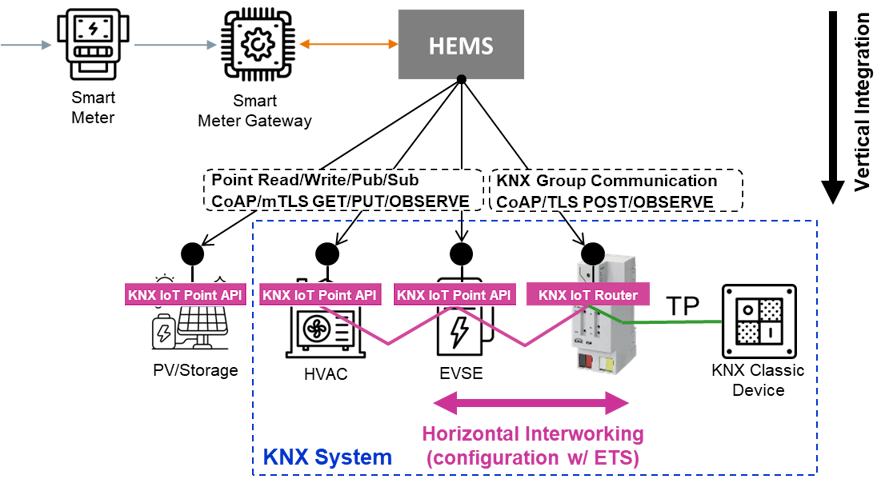
In this example, the horizontal interworking of the KNX subsystem is still configured using ETS. This process ensures that the KNX IoT Router is correctly set up with all necessary data, including cybersecurity proxy settings, making the required information available. The HEMS then establishes a secure TLS session with the KNX IoT Router and subscribes to the messaging endpoint (for example, the /k resource). Consequently, the system transmits all runtime data on the IP area (KNX Backbone Network) bidirectionally between the HEMS and the KNX IoT Router.
Commissioning Example
Securely integrating a stand-alone KNX IoT device with an integration platform follows a straightforward four-step process, as illustrated in the diagram below. This workflow ensures flexible yet secure interaction throughout both onboarding and runtime phases.
This integration workflow relies on four fundamental device capabilities. Device discovery enables identification of KNX devices within a network based on serial number. This enables platforms to locate and interact with devices without prior configuration. Secure device onboarding establishes a trusted connection between the integration platform and the device. This protects from unauthorized access. Device function discovery exposes and enumerates device functions (functional blocks) and datapoints. This enables platforms to understand available features for configuration and control. Finally, read/write and publish/subscribe mechanisms support both synchronous direct access and asynchronous event-driven updates for flexible data exchange.
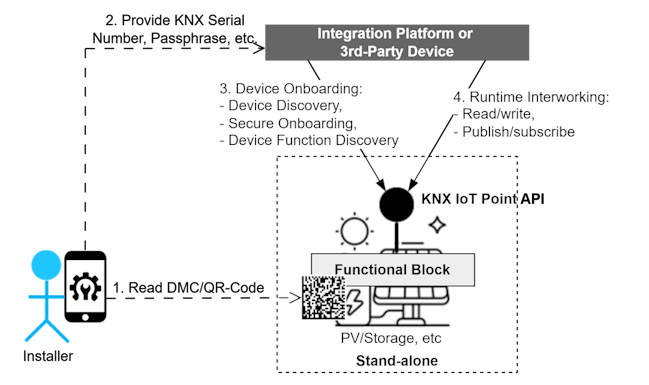
The following steps demonstrate how these capabilities work together in practice. They show the workflow when using a 3rd party commissioning tool:
Step 1: Device Information Acquisition
The process begins by scanning a barcode (DMC or QR code) to obtain device-specific information. This step may also include initial configuration tasks. These tasks include setting up the device application through direct communication channels (Ethernet, WiFi, Thread, or Bluetooth).
Step 2: Provide Device Information to 3rd Party Device
Next, essential onboarding credentials are securely shared with the integration platform. These include minimally the KNX Serial Number and a passphrase. This enables authentication.
Step 3: Secure Device Onboarding
The integration platform then uses these credentials to establish a trusted relationship. The device grants access according to its configured access scope. This ensures that only authorized entities can interact with it.
Step 4: Runtime Interworking
With onboarding complete, the integration platform can now access application-specific datapoints for runtime operations. This includes read/write commands and subscribing to sensor updates.
RESTful Request Examples
The following examples demonstrate how to interact with KNX IoT devices using CoAP requests. The examples use JSON format for readability, though efficient CoAP communication typically uses CBOR encoding in production.
1. Discover Device Functionality (Unicast GET)
To discover all resources hosted by a KNX IoT device, send a CoAP GET request to the /.well-known/core resource. The device responds in CoRE Link Format, listing all available functional blocks and interfaces.
Request:
GET coap://[<IPv6-Address>]/.well-known/core
Response (application/link-format):
</auth>;rt="urn:knx:fb.auth";ct=40,
</dev>;rt="urn:knx:fb.0";ct=40,
</swu>;rt="urn:knx:fb.swu";ct=40,
</k>;rt="urn:knx:if.g.s";ct=60,
</f/rts>;rt="urn:knx:fb.321";ct=40
To enumerate the datapoints of a specific functional block, send a GET request directly to the functional block resource URI obtained from the previous discovery response.
Request:
GET coap://[<IPv6-Address>]/f/rts
Response (application/link-format):
</p/temperature>;rt=":dpa.321.51";ct=50 60
2. Reading a Datapoint (Unicast GET)
To retrieve the current state of a datapoint (for example, Room Temperature), send a CoAP GET request to the specific property resource.
Request (Value Only):
GET coap://[<IPv6-Address>]/p/temperature
Accept: application/json
Response:
{
  "value": 21.5
}
Request (With Metadata):
GET coap://[<IPv6-Address>]/p/temperature?m
Accept: application/json
Response:
{
  "value": 21.5,
  "id": "knx://sn.001122334455/p/temperature",
  "dpt": ":dpt.temp",
  "dpa": ":dpa.321.51",
  "unit": "DEG_C",
  "min": 0,
  "max": 40,
  "cov": 0.5,
  "hbt": 900,
  "if": ["if.s", "if.o"]
}
3. Writing a Datapoint (Unicast PUT)
To control a device (for example, change the setpoint temperature), send a CoAP PUT request with the new value to the property resource.
Request:
PUT coap://[<IPv6-Address>]/p/setpoint
Content-Format: application/json
Payload:
{
  "value": 22.5
}
4. KNX Group Communication
KNX group communication utilizes unicast or multicast messages sent to the /k endpoint, allowing for simultaneous control of multiple devices listening to the same Group Address. For efficiency, CBOR is the standard encoding for these messages where the protocol maps keys to integers. However, JSON is also supported as an optional format.
For vertical integration, a 3rd party device such as a HEMS can interact with the KNX system through a KNX IoT Router. The KNX IoT Router acts as a security proxy and forwards only group telegrams for which it holds valid access rights. This limits the 3rd party device to the specific Group Addresses configured during commissioning.
Request:
POST coap://[ff35:30:...]/k
Content-Format: application/json
Payload:
{
  "sia": 1104,
  "s": {
    "st": 1,
    "ga": 2305,
    "value": 22.5
  }
}
- "sia": Source Individual Address (for example,
1.1.4->1104) - "s": S-Mode message
- "st": Service Type (
1= Write) - "ga": Destination Group Address
- "value": The value that the sender transmits